The best DTF gang sheet file is built at final print size, saved with a transparent background, arranged with smart spacing, and uploaded in high resolution. For most print jobs, 300 DPI is the safest target because it keeps small text, logos, edges, and gradients clean.
Your layout should not feel crammed. Leave space between designs so each piece can be cut after printing. If you want fewer file issues and cleaner production, DTF West Coast gives West Coast creators, brands, Etsy sellers, and shops a practical way to upload gang sheets and order ready-to-press transfers.
Best file setup for DTF gang sheets
Best file setup for DTF gang sheets means final-size artwork, transparent backgrounds, sharp resolution, and enough cut room.
DTF gang sheet file setup should be checked before upload, not after the order is placed.
DTF image resolution matters because low-quality artwork prints soft, blurry, or jagged.
Gang sheet spacing helps prevent cutting problems and keeps designs from running into each other.
Upload artwork for DTF only after checking size, background, file type, and layout.
Why File Setup Matters So Much
A gang sheet is simple in theory. Put several graphics on one sheet. Print them together. Cut them apart. Press them on garments.
Easy, right? Well... mostly.
The file is where good orders start or go sideways. A blurry logo stays blurry. A tiny design prints tiny. A white box around artwork may show up if the background is not removed. A crowded layout can make cutting a pain.
For West Coast print shops, streetwear brands, school spirit sellers, and market vendors, a clean file saves time. It also saves shirts. Nobody likes wasting blanks because one sleeve logo came out fuzzy.
What Is a DTF Gang Sheet?
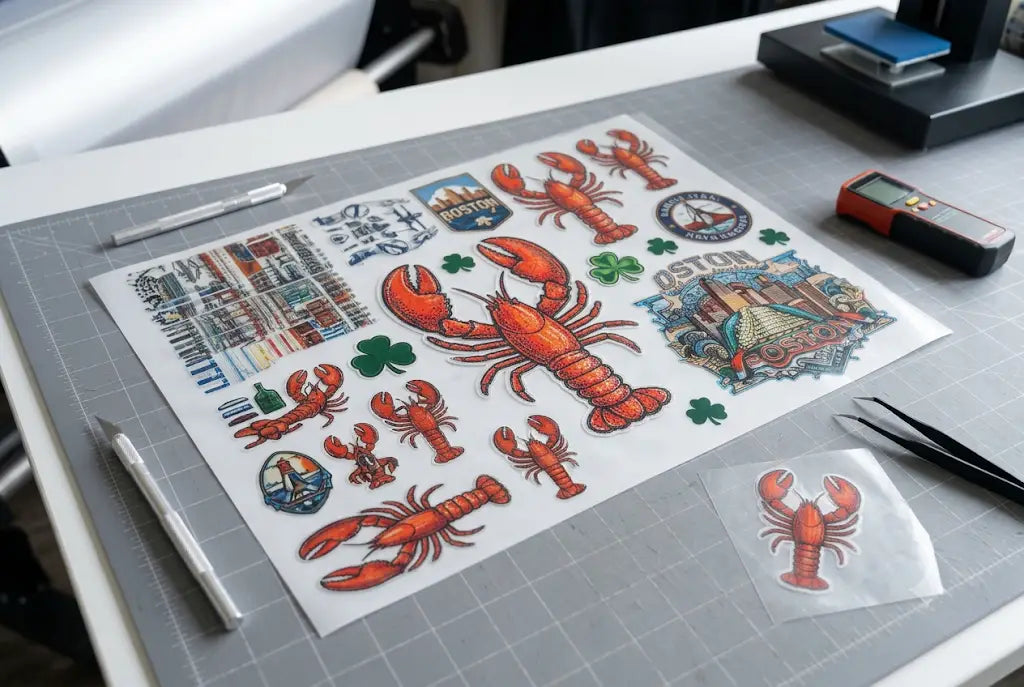
A DTF gang sheet is one large sheet that holds multiple Direct to Film designs. You can place left chest logos, back prints, sleeve marks, neck labels, numbers, and small repeat graphics on the same sheet.
This helps you use space well. It also helps when you need different sizes of the same design.
Why sellers use gang sheets
A Shopify apparel seller may place three front logos, six sleeve prints, and two large back prints together. A Tacoma gym might order member shirt logos plus staff hoodie designs on one layout.
Why layout control matters
The sheet only works well when every design is sized, spaced, and checked before printing. Treat it like packing a suitcase. If you throw things in, it gets messy fast.
DTF Gang Sheet File Setup Basics
Good DTF gang sheet file setup starts with the final print size. Do not build a tiny file and expect it to scale up cleanly.
Set each graphic to the exact size you want on the garment. A left chest logo might be 3.5 inches wide. A full back print might be 11 or 12 inches wide. A sleeve print may be smaller.
Use a transparent background
Your artwork should not have a white box unless that white box is part of the design. Use PNG, PSD, PDF, or another accepted file type with transparency when possible.
Keep artwork clean
Remove stray pixels, rough edges, and leftover background marks. Those little things can show up in print. Annoying as hell, but true.
DTF Artwork Size: How Big Should Each Design Be?
DTF artwork size depends on the garment, placement, and customer style. Bigger is not always better.
A huge logo on a small shirt can look awkward. A tiny logo on a hoodie can disappear. So match the design to the item.
|
Placement |
Common Size Range |
Notes |
|
Left chest |
3 to 4 inches wide |
Good for logos and staff shirts |
|
Full front |
10 to 12 inches wide |
Check shirt size first |
|
Full back |
11 to 13 inches wide |
Hoodies may need more space |
|
Sleeve |
2.5 to 4 inches wide |
Keep text readable |
|
Neck label |
2 to 3 inches wide |
Use clean fonts |
|
Youth shirt front |
7 to 9 inches wide |
Avoid adult sizing |
Gang Sheet File Dimensions
Gang sheet file dimensions should match the sheet size you choose before upload. If the product page offers different sheet lengths, build your file for that exact size.
Do not guess. Do not stretch a finished layout after the fact.
Width and height matter
If the sheet is 22 inches wide, your layout should respect that width. If the sheet is longer, use the extra space for repeat logos, labels, or small add-ons.
Leave a margin
Keep important artwork away from the sheet edge. A small safety margin helps avoid awkward cuts near the border.
DTF Image Resolution and Print Quality
DTF image resolution affects sharpness. Low resolution artwork can print with fuzzy edges, pixelated curves, and weak small text.
For strong results, use 300 DPI at final size. That means the artwork is already built at the size you want it printed.
Vector is best when available
Logos made in vector format can scale cleanly. If you have AI, EPS, SVG, or PDF files from a designer, start there.
Watch screenshots
Screenshots are usually bad print files. They may look fine on your phone, then print like a blurry sticker from 2009. Not the vibe.
DTF File Size Guide
A useful DTF file size guide is not just about megabytes. It is about clean data.
Your file should be large enough to hold detail, but not packed with junk layers, hidden objects, or unused artboards. Flatten what needs flattening. Keep transparency. Check that fonts are outlined or embedded.
|
File Issue |
What Happens |
Fix |
|
Low resolution |
Blurry print |
Use 300 DPI at final size |
|
White background |
Box may print |
Export with transparency |
|
Wrong scale |
Design prints too big or small |
Set final print size |
|
Crowded sheet |
Hard to cut |
Add spacing |
|
Tiny text |
Poor readability |
Increase size or simplify |
|
Stray pixels |
Random marks print |
Clean file before upload |
DTF Gang Sheet Layout Tips
A smart DTF gang sheet layout uses space without making the sheet painful to cut. Place large designs first. Then fill open areas with small logos, sleeve prints, labels, and repeat graphics.
Do not rotate text-heavy designs unless the direction makes sense after cutting. Keep related pieces near each other if they belong to one order.
Group by customer or garment
If you print for several customers, group each customer’s designs together. Future you will be grateful.
Duplicate with care
When you duplicate a design, check that every copy is the correct size. One accidental resize can mess up a full batch.
Gang Sheet Spacing Rules
Gang sheet spacing is one of the most overlooked setup details.
Leave enough room to cut around each design. Tight spacing might save a tiny bit of film, but it can cost time later. It can also lead to nicked edges if you cut by hand.
A good spacing habit is simple: leave visible breathing room between designs. If your scissors or cutter cannot move between prints, the sheet is too packed.
How to Create a DTF Gang Sheet
how to create a DTF gang sheet starts with prepared artwork, not the builder.
Gather your files. Remove backgrounds. Set final sizes. Arrange the largest pieces first. Fill the gaps with small items. Check spacing. Then preview before upload.
Simple setup flow
Use this quick order:
- Pick your sheet size.
- Set artwork to final print size.
- Use transparent backgrounds.
- Arrange large graphics first.
- Add small logos into open space.
- Leave cut room around each design.
- Check resolution before upload.
- Save a final copy for reorders.
How to Build a DTF Gang Sheet Without Design Software
How to build a DTF gang sheet is easier when you use an online gang sheet builder. A builder helps you upload, resize, duplicate, rotate, and place designs before ordering.
This is useful if you do not use Adobe Illustrator or Photoshop every day.
A Seattle clothing brand can build a launch sheet. A Portland market seller can add product logos. A Los Angeles streetwear shop can test several small graphics before going bulk.
DTF Graphics Setup for Cleaner Results
DTF graphics setup should focus on clarity. Strong edges, clean type, and simple layers print better than messy files.
Thin lines can disappear. Tiny text can fill in. Distressed textures may look great, but only if the file is high quality.
Use readable text
Small slogan text may look cute on screen. On fabric, it needs enough size to hold detail.
Check color contrast
Light gray on white may get lost. Dark ink on dark garments may need design changes.
Upload Artwork for DTF the Right Way
Before you upload artwork for DTF, pause for one last check. This is where mistakes get caught.
Open the file at 100 percent view. Look for fuzzy edges, background boxes, wrong sizes, cropped art, or tiny leftovers. Then upload.
“Good file prep is not fancy. It is just caring enough to check before the press gets involved.”
That little habit saves orders.
Common File Mistakes That Cause Bad Prints
Most gang sheet problems are not mysterious. They come from rushing.
The big ones are low-resolution logos, wrong design size, no transparent background, too little spacing, and using screenshots instead of real artwork.
The file looks good on screen
That does not always mean it will print well. Screens glow. Shirts do not.
The customer sent a logo from Instagram
Ask for a better file when possible. A social media image is usually compressed.
Best File Setup for DTF Gang Sheets With DTF West Coast
If you want the Best file setup for DTF gang sheets, start with clean artwork, build at final size, keep backgrounds transparent, use 300 DPI, and leave practical spacing for cutting.
DTF West Coast helps West Coast brands, shops, creators, and small businesses order a DTF gang sheet with a smoother upload process, gang sheet options, and ready-to-press transfer support.
FAQ
What is the best file setup for DTF gang sheets?
Best file setup for DTF gang sheets means artwork at final print size, 300 DPI when possible, transparent backgrounds, proper spacing, and a layout that matches the chosen sheet size.
What size should DTF artwork be?
DTF artwork size depends on placement. Left chest prints are often 3 to 4 inches wide, while full front or back designs are often around 10 to 13 inches wide.
What is DTF gang sheet file setup?
DTF gang sheet file setup is the process of sizing, arranging, spacing, and checking multiple designs before uploading one combined print sheet.
What are common gang sheet file dimensions?
gang sheet file dimensions depend on the sheet option you choose. Build your layout to match the exact width and length of the selected sheet.
How much spacing should be on a gang sheet?
gang sheet spacing should leave enough room to cut each design without nicking the edges. Avoid placing graphics too close together.
What is the best DTF image resolution?
DTF image resolution should usually be 300 DPI at final size for clean detail, sharp edges, and readable small text.
How do you upload artwork for DTF?
To upload artwork for DTF, prepare the file with transparent background, correct size, clean edges, proper resolution, and a layout that matches the selected sheet.
What is a good DTF file size guide?
A good DTF file size guide focuses on final print size, 300 DPI resolution, transparent backgrounds, outlined fonts, clean artwork, and practical spacing.
Conclusion
A clean gang sheet starts before upload. Set the size. Check the resolution. Keep the background transparent. Space the designs. Save the final file.
Do that, and your transfers have a much better shot at printing clean, cutting clean, and pressing clean. Simple setup. Better shirts. Fewer headaches.
Share:
Where to Buy Custom DTF Transfers: A Complete Local Guide
Top 5 Reasons to Choose Local DTF Printing