
Key Highlights
- DTF transfers require precise temperature, pressure, and time for vibrant, durable prints.
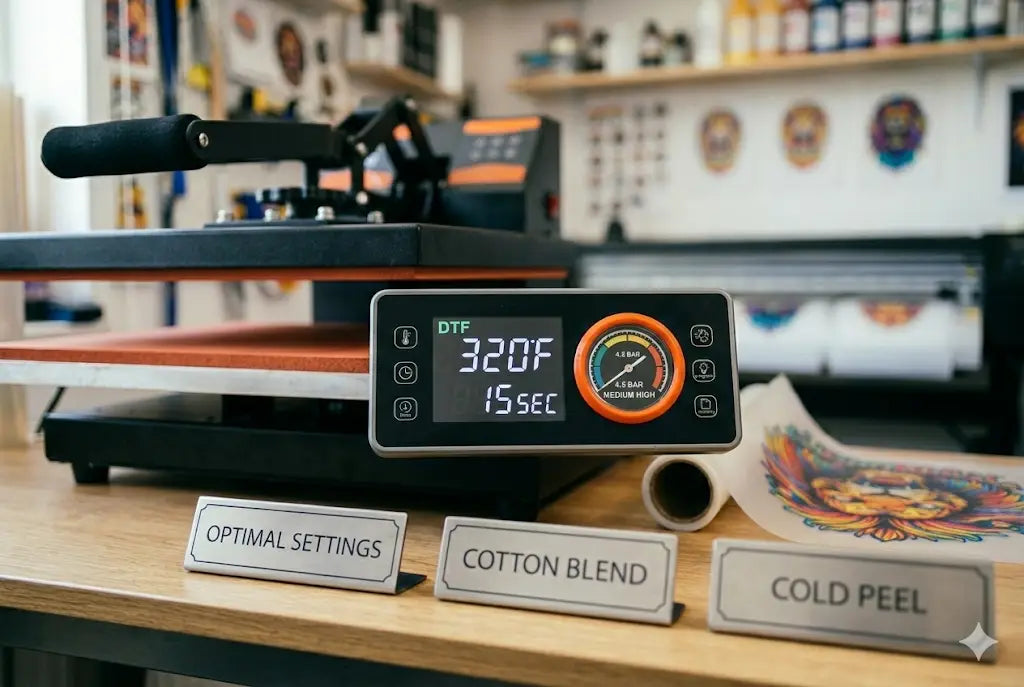
- Recommended best heat press settings for DTF transfers: 160–170°C, 15–25 seconds, medium pressure.
- Second pressing improves adhesion and minimizes peeling.
- Pre testing fabrics ensures the right heat press temperature guide DTF is used for every garment.
- Regular maintenance and following DTF transfers heat press guide prevent common errors and peeling issues.
Start high, stay sharp flawless DTF outcomes hinge on precision beyond design alone. Heat press conditions make or break how well colors pop, stick, and survive wear. A fraction too hot, too light, too brief? That’s when edges lift, shades fade. Get the balance wrong, and even bold graphics look tired fast. Mastery here means fewer surprises down the line, whether you’re just starting out or have years behind the machine.
Start with your fabric choice t-shirts, hoodies, or something else, and getting the heat press right for DTF transfers matters a lot. Follow along here, piece by piece, without rushing ahead. Settings differ, so pay close attention to heat levels and how hard the machine presses down. Mistakes happen, but most can be avoided if you know what to watch for.
Why Correct Heat Press Settings Matter
DTF transfers are sensitive to heat and pressure. Applying too much heat or pressing too long can cause colors to burn, while too little heat can result in weak adhesion. By following a proper heat press temperature guide DTF, your prints will remain vibrant and durable even after repeated washes.
A detailed DTF transfers heat press guide not only protects your prints but also reduces material waste and increases production efficiency. Knowing your DTF heat press temperature time and pressure ensures consistent results across different garments.
Ideal Heat Press Settings for DTF Transfers
For standard DTF transfers, the recommended ideal heat press settings for DTF are generally:
-
Temperature: 160–170°C (320–338°F)
-
Time: 15–25 seconds depending on garment type
-
Pressure: Medium firm; adjust for thick or thin fabrics
Correct heat press pressure DTF transfers is key. Too much pressure can distort fabrics, while too little prevents proper adhesion. Testing a small swatch before full production is always recommended. Understanding DTF transfer pressure settings helps prevent DTF transfer peeling issues.
Step by Step Guide to Heat Pressing DTF Transfers
Preparing your equipment and following precise steps ensures flawless results. First, preheat the press to the correct temperature, then place the garment flat and smooth out wrinkles. Position your DTF transfer accurately and cover it with parchment paper.
Press according to the recommended DTF heat press temperature time, then peel the film as instructed. Some films require hot peeling, others cold. Always follow the DTF transfers heat press guide for specific products.
Mastering how to heat press DTF transfers correctly reduces mistakes and guarantees strong adhesion and vibrant prints every time.
Temperature Guidelines for Different Fabrics
Different fabrics require different heat levels. Cotton fabrics handle medium high heat well, while polyester fabrics need slightly lower temperatures to prevent melting or color distortion. Blends often require testing small swatches to find the best combination of time and temperature. Using a heat press temperature guide DTF for each fabric ensures consistent, high quality results across your products.
Managing Pressure to Avoid Peeling
Pressure is as important as temperature. Proper DTF transfer pressure settings ensure the adhesive binds effectively to the garment. Uneven pressure often causes corners to lift or partial adhesion. Refer to a DTF transfers heat press guide to maintain proper distribution.
Regular cleaning of your press platen and using protective sheets ensures even pressure and protects both your DTF transfers and your equipment.
Second Press: A Small Step for Stronger Prints
Many experts recommend a second press to lock in adhesion. After peeling the transfer, cover with parchment and press for about 5 seconds. This small step enhances durability and prevents DTF transfer peeling issues, making your prints last longer. Following the DTF transfers heat press guide ensures the second press doesn’t overheat the fabric or print.
Bulk Production Tips
For high volume production, maintaining consistent heat press settings for DTF is essential. Pre test swatches, log your DTF transfer heat press settings, and ensure staff follow standardized workflows. Rotate garments for even pressure and maintain equipment regularly.
Applying heat press time for DTF transfers correctly ensures that every item in your batch comes out with professional quality and vibrant color. Following these DTF transfers heat press guide steps will streamline your production process.
Common Mistakes to Avoid
Even experienced printers make errors, including:
-
Pressing too hot or too long, causing color issues
-
Using uneven pressure, leading to lifted edges
-
Not accounting for fabric type variations
-
Ignoring manufacturer specific DTF transfer heat press settings
Being aware of these pitfalls and following a heat press temperature guide DTF helps you prevent costly errors and produce consistent, durable DTF transfers.
Caring for DTF Transfers
After pressing, let garments cool before folding. Avoid ironing directly over the transfer and follow proper care instructions. Correct application and post care extend the life of your DTF transfers and protect your investment.
Sharing care tips with your customers ensures satisfaction and reduces complaints about peeling or fading.
Conclusion
Using the best heat press settings for DTF transfers is essential for professional, vibrant, and durable prints. Correct DTF heat press temperature time, pressure, and workflow prevent common mistakes and DTF transfer peeling issues.
Whether producing single garments or bulk orders, proper pressing techniques ensure consistency and quality. For premium DTF transfers, expert guidance, and reliable supplies, visit DTF West Coast.
FAQs
1. What are the ideal heat press settings for DTF transfers?
The ideal settings for DTF transfers are 160–170°C, 15–25 seconds, and medium firm pressure. Adjust based on fabric type for optimal adhesion and durability.
2. How can I prevent DTF transfer peeling issues?
Proper temperature, pressure, and timing are crucial. Pre test on swatches, use even pressure, follow a DTF transfers heat press guide, and consider a second press for stronger adhesion.
3. How do I heat press DTF transfers correctly?
Preheat the press, smooth the garment, position the transfer, cover with parchment, press according to recommended settings, and peel according to the manufacturer’s instructions for flawless prints.
4. What temperature is best for cotton DTF transfers?
Medium high heat (160–170°C) works best for cotton. Press for 15–25 seconds depending on fabric thickness. Pre testing ensures vibrant prints and avoids scorching.
5. Should I do a second press?
Yes. After peeling, cover with parchment and press for 5 seconds. This step improves adhesion, color vibrancy, and reduces peeling issues.
6. What pressure should I use for DTF transfers?
Use medium firm pressure. Too much can distort the fabric; too little leads to weak adhesion. Always check DTF transfer pressure settings for optimal results.
7. How do settings differ by fabric?
Cotton tolerates medium high heat, polyester requires slightly lower temperature, and blends need testing. Follow a heat press temperature guide DTF for each fabric type.
8. Can I mass produce DTF transfers efficiently?
Yes. Maintaining consistent heat press settings for DTF, pre testing fabrics, and logging DTF transfer heat press settings ensures consistent quality across bulk production.
9. How do I troubleshoot peeling or lifted edges?
Check for even pressure, correct temperature, and proper peel method. Adjust DTF transfer pressure settings and follow a DTF transfers heat press guide for your specific film.
10. How should I store DTF transfers?
Store in a cool, dry place, away from sunlight. Avoid folding or bending films to maintain optimal print quality and prevent adhesion issues during pressing.
Share:
DTF Gang Sheet Sizes Explained: Which Size Gives You Maximum Profit & Zero Waste?
How to Start a DTF Transfer Business