Author: DTF West Coast Team
Reviewed by: Production Lead at DTF West Coast
Best for: apparel brands, Etsy sellers, Shopify sellers, print shops, local businesses, event teams, and creators across Tukwila, Seattle, Tacoma, Portland, Menlo Park, the Bay Area, and the West Coast.
Quick Answer
A DTF gang sheet lets you place several designs on one transfer sheet, including chest logos, sleeve prints, back prints, names, numbers, and neck labels. It helps you use more sheet space, lower waste, and order several transfers at once. The best results come from clean artwork, correct sizing, clear cut space, and a file that is ready for print.
DTF West Coast offers custom DTF prints, UV DTF printing, and gang sheet builder options for creators, small businesses, and apparel brands across Tukwila, Seattle, Portland, and nearby West Coast areas.
What Is a DTF Gang Sheet?
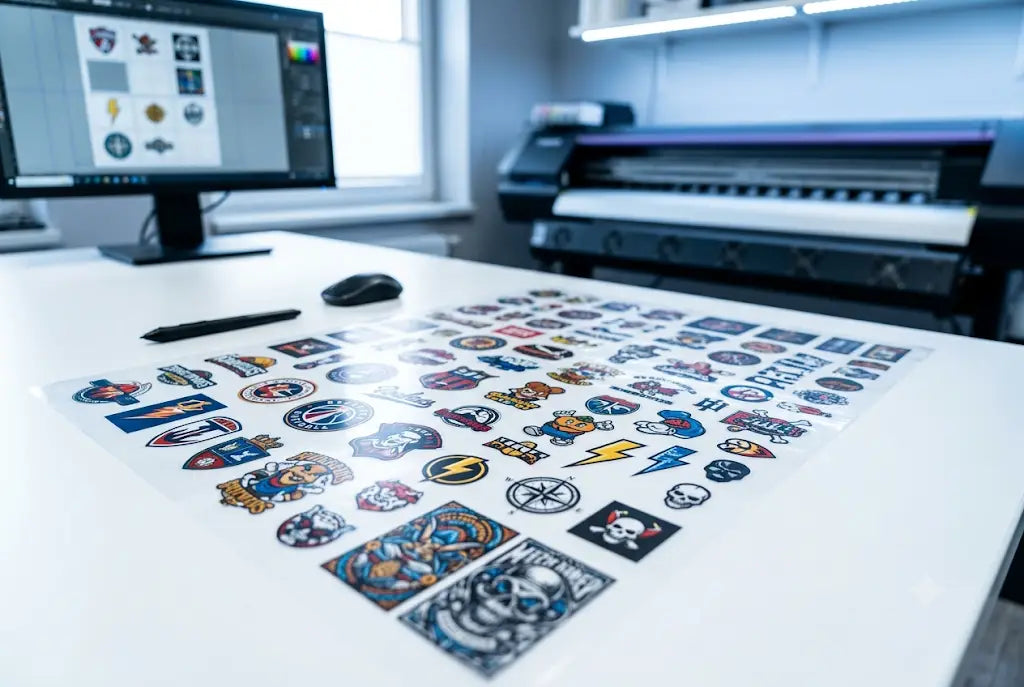
A DTF gang sheet is one large transfer sheet with several designs arranged together before printing. Instead of ordering one logo, one back print, and one sleeve mark as separate transfers, you place them together on one sheet.
This is useful when you have more than one design or size. A clothing brand in Capitol Hill may need left chest logos, sleeve prints, back graphics, and neck labels for a hoodie drop. A Portland maker selling near Alberta Arts District may need shirt graphics and tote bag logos for a weekend market. A Tukwila business near Southcenter may need staff shirts for a local event.
The point is simple. You plan the sheet around the real order instead of wasting space or buying transfers one by one.
Who Should Use DTF Gang Sheets?
DTF gang sheets are useful for people who need several designs, sizes, or placements.
Small apparel brands can use them for new drops, restocks, hoodie logos, and shirt labels. Etsy and Shopify sellers can use them for repeat designs, seasonal shirts, baby onesies, tote bags, and made to order apparel. Local businesses can use them for staff shirts, uniforms, event merch, gym apparel, food truck shirts, salon shirts, and school club orders.
Print shops can also use gang sheets for overflow work, short runs, repeat logos, and customer supplied artwork. For example, a shop in Tacoma may use one sheet for a small business order that includes front logos, back prints, and sleeve marks.
This format works well for West Coast buyers because many orders are small, mixed, and time sensitive. A Seattle pop up, a Portland fundraiser, or a Menlo Park startup event may not need a large screen print run. They may only need clean transfers that are easy to press.
Why Gang Sheets Help Small and Bulk Orders
A gang sheet helps when the order has several moving parts. You may need one large design, three logo sizes, a few sleeve marks, and a small label. Placing everything together helps you see the full order before it goes to print.
That can help reduce missed pieces. It can also help lower unused film space. Instead of leaving open areas around single transfers, you can fill gaps with small logos, labels, or repeat designs.
Google’s guidance says strong content should be made to help people first, not mainly to manipulate search rankings. That is why this guide focuses on real setup choices, common artwork problems, spacing, local use cases, and order planning.
How to Make a DTF Gang Sheet Step by Step
If you want to know how to make a DTF gang sheet, start with the order plan before you open the builder.
Step 1: List every design
Write down each item you need. Include chest logos, back prints, sleeve prints, neck labels, names, numbers, and any small brand marks.
Step 2: Choose the right sheet size
Pick a sheet size that fits the order while leaving room to cut each transfer. Do not choose the smallest size if it forces designs too close together.
Step 3: Prepare the artwork
Use clean artwork with sharp edges. Avoid screenshots, blurry files, and images pulled from small previews. Check that the background is removed if you do not want a box around the design.
Step 4: Place large designs first
Put large back prints or hoodie graphics on the sheet first. Then use smaller open areas for chest logos, sleeve prints, and labels.
Step 5: Leave cut space
You need room to trim each transfer after printing. If designs touch or sit too close, cutting becomes harder.
Step 6: Review before upload
Check spelling, size, direction, background, and spacing. Save a copy of the final layout so reorders are faster.
How a DTF Gang Sheet Builder Helps
A DTF gang sheet builder lets you upload artwork, resize designs, duplicate graphics, rotate simple shapes, and arrange everything before ordering. This is helpful if you do not use design software every day.
A builder also helps sellers move faster. A Shopify seller can duplicate a best seller in several sizes. A local business can place front and back logos together. A print shop can organize repeat logos for short run work.
DTF West Coast has a gang sheet builder page where customers can combine multiple designs on one sheet and prepare custom gang sheets online.
DTF Gang Sheet Setup: What to Check Before Upload
A good DTF gang sheet setup starts with the file. Make sure each design is set at the final print size. A left chest logo, sleeve mark, and back print should not all be the same size unless that is truly what you want.
Use a transparent background when the design should not have a box behind it. Adobe notes that transparency needs the right file settings when artwork is printed or saved and that some formats handle transparency better than others.
Also, check the small text. Thin letters, tiny dates, and fine lines can be hard to read if the artwork is too small or of low quality. If the design looks fuzzy before upload, it will not become cleaner after printing.
DTF Gang Sheet File Requirements for Better Printing
The most important DTF gang sheet file requirements are simple.
-
Use high resolution artwork.
-
Set each design to the final print size.
-
Use a transparent background when needed.
-
Keep edges clean.
-
Make small text readable.
-
Leave room between designs.
-
Use a file type accepted by the printer.
-
Review the full sheet before sending it.
PNG is often used when transparent backgrounds matter. PDF, AI, EPS, PSD, JPG, or SVG may also work depending on the upload rules. If your file was made in Adobe Illustrator or Photoshop, check the export settings before ordering.
Do not upload a screenshot unless the printer says it is acceptable. Screenshots are often low quality and may create rough edges, fuzzy text, or unwanted backgrounds.
DTF Gang Sheet Spacing Tips to Avoid Cutting Problems
The best DTF gang sheet spacing tips are practical. Leave enough room to cut each design without touching the next one. Do not overlap designs. Do not let soft shadows, thick outlines, or glow effects run into nearby artwork.
Keep similar pieces together. Place chest logos near chest logos, sleeve prints near sleeve prints, and labels near labels. This makes trimming faster and helps keep the order organized.
A layout that looks tight on screen can become a problem when the sheet is in your hands. If you cannot cut between two designs without stress, they are too close.
How to Maximize DTF Gang Sheet Space Without Hurting Quality
To maximize DTF gang sheet space, start with the largest designs. Place back prints first. Then fill open areas with small logos, sleeve marks, tags, and labels.
Use corners carefully. Repeat designs can fit into spaces that would otherwise stay empty. You can rotate simple shapes if it helps the layout, but do not make the sheet confusing.
The goal is not to cram every inch. The goal is to use the sheet well while keeping each transfer easy to cut, sort, and press.
Best Way to Use Gang Sheets DTF for Different Projects
The best way to use gang sheets DTF depends on the order.
For clothing brands, place front logos, sleeve prints, neck labels, and back graphics together. For Etsy sellers, group repeat designs and seasonal graphics. For local events, include sponsor logos, names, dates, and shirt graphics. For school clubs near the University of Washington, Seattle University, Portland State University, or local community colleges, a sheet can hold the main event design plus smaller add ons.
For print shops, keep each customer’s artwork grouped. If several jobs are on one sheet, add clear labels outside the print area only if your production workflow allows it. The goal is to avoid mixing up customer designs after cutting.
DTF Gang Sheet Design Tips for Cleaner Transfers
Use these DTF gang sheet design tips before placing your order.
Use bold artwork when possible. Keep small text readable. Remove backgrounds you do not want printed. Match each design to the garment placement. Check spelling, dates, names, and numbers. Keep brand colors consistent across the sheet. Save a copy of the final file for future orders.
For apparel, think in real placements. A left chest logo is usually much smaller than a hoodie back print. A sleeve print may need a narrow shape. A neck label should stay readable after pressing.
Common DTF Gang Sheet Layout Mistakes That Waste Money
The most common DTF gang sheet layout mistakes happen before the file is uploaded.
Blurry artwork is one problem. Wrong sizing is another. Some people forget to remove the background. Others place designs too close together, leave huge blank areas, overlap transparent edges, or forget small sleeve logos and labels.
Spelling mistakes are also common. Check names, player numbers, event dates, brand names, and slogans. One small typo can make a transfer unusable.
Most problems can be avoided with a final review. Look at the sheet as if you are about to cut and press every piece yourself.
How to Optimize DTF Transfer Sheet Layout for Less Waste
To optimize DTF transfer sheet space, plan the order before uploading. Make a list of designs. Place large artwork first. Fill gaps with smaller graphics. Keep related items grouped. Leave clear cut space.
This can help reduce waste in DTF printing because more of the sheet is used for artwork instead of empty film. It can also help reduce reorders caused by missing pieces.
Example: a Seattle gym order may need 24 left chest logos and 24 large back prints. A good layout may place the large back prints first, then use smaller open spaces for chest logos and extra sleeve marks.
DTF Gang Sheets vs Single Transfers
Single transfers are better when you only need one design. Gang sheets are better when you need several designs, sizes, or placements.
A single transfer keeps ordering simple. A gang sheet gives you more control over the full order. For a one time logo, single may be enough. For a clothing drop, team order, staff shirt order, or mixed merch run, a gang sheet is often easier to manage.
DTF Gang Sheets vs Screen Printing, Vinyl, and Sublimation
Each method has a place.
Screen printing can make sense for larger runs with the same design. Heat transfer vinyl can work for simple names, numbers, and one color designs. Sublimation is often used on certain light colored polyester items.
DTF is useful when you need full color artwork, mixed designs, and smaller runs on shirts, hoodies, totes, and fabric blends. It is also useful when a local business needs several designs without committing to a large run.
Local Uses for West Coast Buyers
This topic should feel local because the buyers are local.
In Tukwila, a business near Southcenter may need staff shirts before a weekend sale. In Seattle, a Capitol Hill streetwear brand may prepare a small hoodie drop. In Tacoma, a youth team may need names and numbers. In Portland, makers near Alberta Arts District or Hawthorne may need market shirts and tote bags. In Menlo Park, a startup near Sand Hill Road may need launch event apparel. In the Bay Area, a small brand may need shirts for a pop up in San Jose or Oakland.
These details matter because local buyers want more than a product page. They want to know the printer understands small orders, short timelines, local pickup needs, and West Coast shipping.
Before You Order: Quick Checklist
Before you upload, check this list.
-
Artwork is clear.
-
Background is transparent if needed.
-
Each design is final size.
-
Text is spelled correctly.
-
Names, dates, and numbers are correct.
-
There is enough cut space.
-
Designs do not overlap.
-
The sheet size is right.
-
The file type is accepted.
-
The final layout is saved.
Why Order from DTF West Coast?
DTF West Coast is built for creators, apparel brands, small businesses, print shops, and local buyers who need custom DTF transfers, UV DTF options, and gang sheet ordering with a West Coast focus. The site already highlights custom DTF printing and gang sheet builder solutions for Tukwila, Seattle, Portland, and surrounding areas.
That local focus is helpful for buyers who want a clear upload process, transfer options for shirts and hoodies, and support for small batch or bulk orders.
Use the builder, check your spacing, upload clean artwork, and prepare your next apparel order with fewer layout problems.
Frequently Asked Questions
What is a DTF gang sheet?
It is one transfer sheet with several designs placed together. You can include logos, back prints, sleeve prints, names, numbers, and labels.
How do I make a DTF gang sheet?
Upload your artwork, choose a sheet size, arrange each design, leave cut space, check the preview, and submit the final file.
What is a DTF gang sheet builder?
It is an online tool that helps you upload, resize, duplicate, rotate, and arrange designs before ordering.
Can I put different designs on one sheet?
Yes. You can place different logos, sizes, names, numbers, and graphics together if they fit and have enough room for trimming.
What are the best spacing tips?
Leave clear room between designs, avoid overlap, keep small text away from cut lines, and do not place artwork too close to the sheet edge.
How do I use more sheet space?
Place large graphics first, then fill open spaces with small logos, sleeve prints, tags, and repeat designs.
What file requirements matter most?
Use clear artwork, correct sizing, transparent backgrounds when needed, readable text, enough spacing, and an accepted file type.
Are gang sheets better than single transfers?
They are better when you need several designs or sizes. Single transfers are simpler when you only need one design.
Can DTF work on cotton and polyester?
DTF transfers are commonly used on cotton, polyester, and fabric blends for shirts, hoodies, tote bags, and other apparel.
How do gang sheets reduce waste?
They let you fill unused sheet space with smaller designs, which can lower empty film area and keep the order more organized.
Are they useful for small clothing brands?
Yes. They help small brands test designs, prepare drops, restock logos, and order several placements without large runs.
Can local businesses use them?
Yes. Local businesses can use them for staff shirts, event apparel, gym merch, school club shirts, pop up merch, and branded workwear.
Share:
What is the story behind 4th of July T-shirt designs?
How durable are uv dtf stickers?