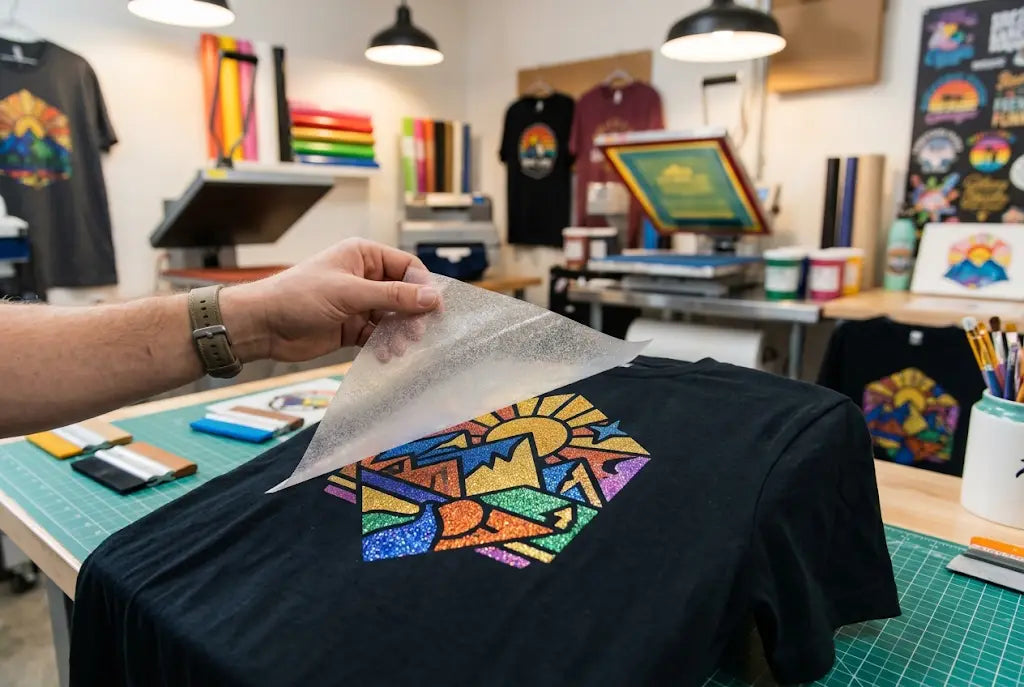
Glitter DTF transfers help creative brands make shirts, hoodies, tote bags, dance merch, school spirit wear, event apparel, and boutique drops feel brighter and more memorable. Direct to Film, or DTF, printing already supports bold color and detailed artwork. Glitter-style transfers add shine, which can make the design feel more retail-ready.
If you plan more than one glitter design, a DTF gang sheet helps keep the order organized. You can place multiple graphics on one sheet, cut them apart, and press them as needed. For West Coast brands that move fast, DTF West Coast helps creators, teams, shops, and apparel sellers order custom transfers and gang sheets with less production guesswork.
Why Glitter DTF Transfers Fit Creative Brands
Glitter DTF transfers work best with bold artwork, clean shapes, readable lettering, and strong contrast. Creative brands need pieces that stop people mid-scroll.
A regular tee can look clean. A glitter design can look like it belongs at a pop-up table, concert booth, cheer event, boutique rack, or school spirit sale. It has motion. It catches light. It feels fun.
That matters on the West Coast, where sellers compete at markets, launch nights, local events, and social feeds every weekend. A San Diego creator may want summer merch. A Portland vendor may want festival tees. A Seattle school club may want sparkle for spirit week.
Glitter is not for every design. But for the right design... yeah, it pops.
What Makes Glitter DTF Different?
Glitter DTF transfers are made to add a sparkly finish to printed apparel without the slow process of cutting and layering glitter vinyl by hand.
The finish works best when the artwork has enough body. Bold letters, mascots, simple logos, thick outlines, and event names usually show the sparkle better than tiny detail.
Best artwork for glitter
Glitter works well for team names, cheer designs, dance shirts, birthday tees, holiday drops, boutique logos, creator merch, bold slogans, and limited apparel runs.
Artwork that needs care
Tiny script, thin outlines, soft gradients, small photo details, and very narrow text may not show the effect clearly. The sparkle can overpower small parts.
Where a DTF Gang Sheet Helps Glitter Orders
A DTF gang sheet helps when you have multiple designs, sizes, or placements.
Instead of ordering one glitter-style transfer at a time, you can group designs together. Front prints, back prints, sleeve logos, names, labels, and small brand marks can share the same sheet.
That saves time during setup. It also makes pressing day easier because the artwork arrives in one planned layout.
|
Glitter Order Type |
Why Gang Sheets Help |
Smart Layout Move |
|
Brand launch |
Holds multiple designs |
Put best sellers first |
|
Team apparel |
Groups names and logos |
Keep by player or size |
|
Boutique merch |
Supports mixed designs |
Group by collection |
|
Event shirts |
Speeds batch pressing |
Sort by placement |
|
Sleeve logos |
Uses small gaps |
Add into open space |
|
Reorders |
Keeps repeat art ready |
Save the final layout |
How DTF Gang Sheets Support Custom Merch
DTF gang sheets are useful because custom merch rarely has only one design.
A creative brand may need a front logo, large back graphic, sleeve mark, and neck label. A team may need names and numbers. A boutique may need three shirt designs in different sizes.
Putting everything on one sheet keeps the order together.
Group by product
If you are making tees, hoodies, and totes, group the designs by item. That makes cutting and pressing less confusing.
Group by customer or drop
If you sell multiple collections, keep each drop in its own section. Small detail. Big help.
Ready to Press Gang Sheets for Faster Merch Runs
Ready-to-press gang sheets help you skip the print setup and focus on production.
You cut the transfers, place them on the garment, press them, peel them, and finish according to the instructions. No in-house printer. No powder mess. No curing station.
For small brands, that is huge. It lets you test glitter designs without buying equipment or turning your workspace into a mini print lab.
How a Gang Sheet Builder Helps With Glitter Designs
A gang sheet builder lets you upload artwork, resize designs, duplicate logos, rotate graphics, arrange the sheet, and preview the layout before ordering.
That preview is the safety net.
You can catch wrong sizes, missing copies, tight spacing, and unused space before the order goes through. It also helps if you do not use design software every day.
Builder benefit for brands
A builder gives you visual control. You can see how the sheet uses space and adjust before checkout.
Builder limit
A builder cannot repair bad artwork. A blurry screenshot will still print blurry. Annoying, but true.
DTF Gang Sheet Builder for Creative Production
A DTF gang sheet builder is especially helpful when your order has repeat designs.
Say you need ten glitter chest logos, four large back prints, and six small sleeve marks. You can size one logo, duplicate it, then fill the sheet with the rest.
That reduces handwork and helps keep designs consistent.
How to Make a DTF Gang Sheet for Glitter Transfers
HowN to make a DTF gang sheet starts with a clear list.
Write down each design, final print size, quantity, garment type, and placement. Then choose the sheet size. Place the largest designs first. Add smaller graphics into useful open areas.
Use approved artwork only
Do not start with a customer’s blurry phone screenshot. Get the clean file first. Your print can only be as good as the artwork.
Build for the real order
Do not fill gaps with random designs you will never press. That is not saving money. That is sparkly clutter.
How to Build a Gang Sheet Without Layout Problems
How to build a gang sheet comes down to clean order.
Place large designs first. Keep related pieces together. Leave cut room. Check each design at full size. Save the layout with a clear name.
Simple glitter gang sheet checklist
-
Confirm every design is approved.
-
Set each design to final print size.
-
Use transparent backgrounds where needed.
-
Place large graphics first.
-
Add small logos into real open space.
-
Leave a clean cutting room.
-
Preview the full sheet.
-
Save the layout for reorders.
Gang Sheet Layout Tips for Glitter Transfers
Good gang sheet layout tips protect both the print and the workflow.
Use bold shapes. Keep text readable. Leave room between designs. Avoid ultra-thin details. Keep duplicate logos the same size. Group artwork by job, placement, or collection.
“Glitter makes the design loud, but the file setup still needs to be calm.”
That is the shop-floor truth. Fun finish, disciplined layout.
Custom Gang Sheet Planning for Creative Brands
A custom gang sheet lets you build the sheet around your actual product plan.
A boutique can place seasonal graphics, sleeve marks, and logo prints on one sheet. A dance team can group names, mascots, and hoodie backs. A creator can test several glitter designs before buying more.
Use it for launches
For a launch, group designs by product type. Put tee graphics together. Put hoodie graphics together. Keep small add-ons in the open spaces.
Use it for reorders
Save the sheet file by drop name, date, and sheet size. Future orders get much easier.
Custom DTF Gang Sheet for West Coast Sellers
A custom DTF gang sheet fits the way local sellers work.
Seattle makers prep weekend booths. Portland vendors restock after markets. Los Angeles brands test limited drops. Bay Area startups order staff merch before events.
A planned sheet keeps things moving when deadlines get tight.
Maximize Gang Sheet Space Without Overcrowding
To maximize gang sheet space, fill blank areas with useful artwork.
Good fillers include sleeve marks, pocket logos, neck labels, small names, reorder icons, and test designs you plan to press soon.
Bad fillers are random ideas you will forget about. Space can feel wasteful, but useless transfers waste time too.
Leave room to cut
If scissors or a cutter cannot move between graphics, the sheet is too tight. Give the design room to breathe.
Gang Sheet Printing and Glitter File Quality
Gang sheet printing depends on the file.
Use high-resolution artwork. Keep edges clean. Remove unwanted backgrounds. Avoid screenshots. Set every design at final print size. Check the layout at 100 percent before ordering.
Glitter can make strong artwork look better. It cannot hide weak artwork. Sometimes it makes weak artwork look worse. Harsh, but helpful.
Gang Sheet File Requirements Before Ordering
Strong gang sheet file requirements make glitter orders cleaner.
Your artwork should be sharp, correctly sized, transparent where needed, and arranged to match the sheet you choose. Small text should still be readable. Logos should not be stretched. Edges should be clean.
|
File Check |
What to Look For |
Why It Matters |
|
Resolution |
Sharp edges at full size |
Cleaner print result |
|
Size |
Final print dimensions |
Better garment placement |
|
Background |
Transparent where needed |
Avoids unwanted boxes |
|
Spacing |
Room between graphics |
Easier cutting |
|
Text |
Readable at print size |
Better customer experience |
|
Reorders |
Saved final layout |
Faster repeat orders |
Order Glitter DTF Transfers With DTF West Coast
If your brand needs sparkle without turning production into chaos, start with clean artwork, strong sizing, and a planned DTF gang sheet when you have several designs.
DTF West Coast helps West Coast creators, apparel brands, schools, teams, and print shops order custom transfers, DTF gang sheets, ready-to-press gang sheets, and builder layouts for bold custom merch that is easier to cut, sort, and press.
FAQ
What are glitter DTF transfers?
Glitter DTF transfers are custom Direct to Film transfers made to add a sparkly, eye-catching finish to apparel, merch, team wear, and event shirts.
Can glitter transfers be placed on a DTF gang sheet?
Yes, a DTF gang sheet can hold multiple glitter-style designs, making it easier to organize, cut, sort, and press custom merch.
What are DTF gang sheets used for?
DTF gang sheets are used to combine logos, names, sleeve designs, labels, back prints, and reorder graphics on one transfer sheet.
What are ready-to-press gang sheets?
Ready-to-press gang sheets are printed transfer sheets that arrive ready to cut and heat press onto compatible garments.
What is a gang sheet builder?
A gang sheet builder is an online tool that lets you upload, size, duplicate, arrange, and preview artwork before ordering.
How do you make a DTF gang sheet for glitter designs?
How to make a DTF gang sheet starts with approved artwork, final print sizes, transparent backgrounds, large designs first, and enough cut space.
What are the best gang sheet layout tips for glitter prints?
Gang sheet layout tips include using bold artwork, keeping text readable, leaving cut room, grouping related designs, and checking the preview.
What file requirements matter for glitter gang sheets?
Gang sheet file requirements include sharp artwork, correct sizing, transparent backgrounds, clean edges, readable text, and space between designs.
Conclusion
Glitter DTF transfers are built for brands that want custom merch to feel brighter, bolder, and more memorable.
Start with clean artwork. Plan the sheet. Leave space. Save the layout. Then press your glitter designs with confidence.
Share:
Glitter DTF Transfers: A Complete Guide for Bold Custom Prints
How to Calculate the Right DTF Gang Sheet Size for Your Order