Author: DTF West Coast Team
Reviewed by: Production Lead, DTF West Coast
Updated: May 2026
What Is 3D UV DTF Printing?
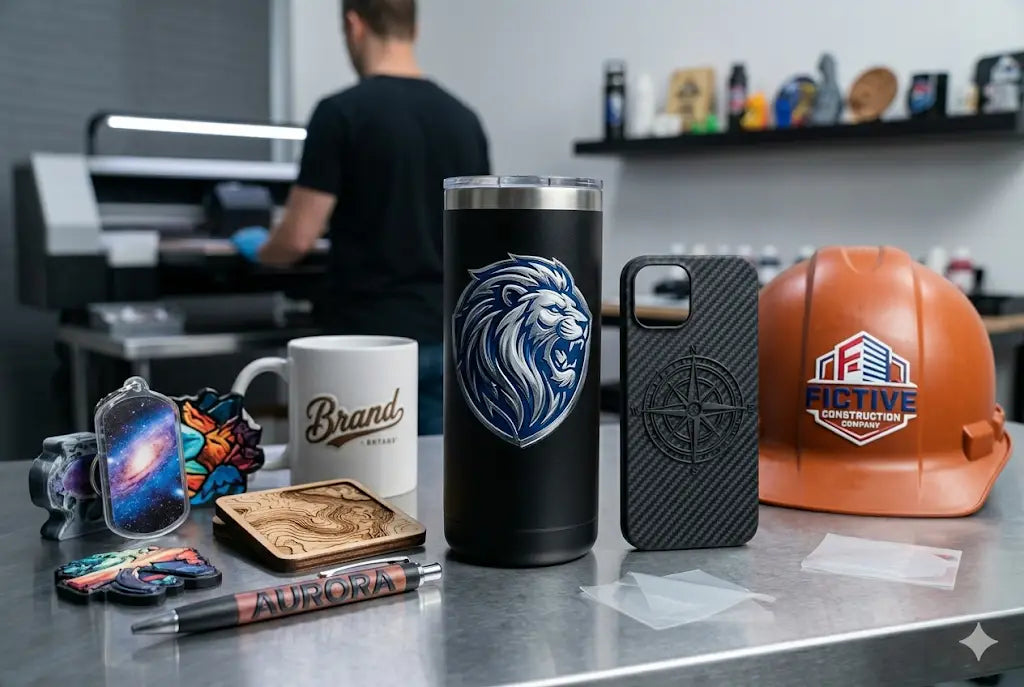
3D UV DTF printing is a hard-surface transfer process that creates raised, full-color decals on glass, plastic, acrylic, coated metal, ceramic, and sealed wood, without a heat press. The artwork is printed onto a specialized Film A using UV-curable inks, cured instantly by ultraviolet light, then laminated with a Film B carrier sheet. You peel the backing, press the decal onto a clean, smooth surface by hand, and peel the carrier film away, leaving only the ink and protective varnish bonded to the product.
The "3D" in the name describes the physical result: the built-up layers of ink and varnish give the final sticker a glossy, raised effect that you can feel, a tactile quality that adds a sense of value and sophistication that flat stickers lack.
No heat press. No weeding. No equipment beyond a squeegee and isopropyl alcohol.
The Anatomy of a 3D UV DTF Transfer: Three Layers That Do All the Work
Understanding how a UV DTF decal is built explains why it looks and performs differently from every other label or sticker option on the market.
Unlike standard stickers printed on paper or vinyl gang sheets, UV DTF transfers are composed of three distinct layers: a specialized adhesive base, a high-tack glue that bonds chemically to non-porous surfaces; UV-cured inks, vibrant, full-color inks dried instantly using ultraviolet light; and a varnish finish, a clear, protective topcoat that provides the 3D raised texture and high-gloss shine.
That varnish layer is the key detail most buyers do not know about. It is what creates the raised feel. It is also what makes the decal scratch-resistant and water-resistant. And critically, when you apply UV DTF transfers, only the ink and varnish remain on the object, giving it a premium, professional "printed-on" look that traditional stickers simply cannot replicate.
No background film. No visible sticker edge. Just the design, bonded directly to the surface.
The three-layer structure produces four performance outcomes that matter for your product
Full color without limits
Traditional vinyl limits you to solid colors. With UV DTF, you can print photographs, complex gradients, and thousands of colors in a single pass. Every design, gradients, photographic artwork, fine text, QR codes, and multi-element logos, prints in one pass with no color count restrictions.
Raised tactile feel
The varnish topcoat builds above the surface of the product, creating a physical texture you can feel with your fingertip. This is what distinguishes a UV DTF decal from a flat label and gives branded packaging, drinkware, and gifts a retail-quality finish.
Waterproof and scratch-resistant
While permanent vinyl can peel at the edges over time, the UV-cured resin in these transfers is scratch-resistant and highly waterproof. Applied correctly on a properly cleaned surface, UV DTF decals resist condensation, hand washing, and everyday handling.
No equipment required on your end
The beauty of this technology is that it requires zero machinery. You don't need a heat press or a laminator. You need isopropyl alcohol, a squeegee or firm cloth, and clean hands.
How the Print Process Works: Film A, Film B, and UV Curing
The process involves printing a design onto a "Film A" using a UV printer, which instantly cures the ink using ultraviolet light. After printing, a laminating machine applies a "Film B", the carrier sheet, over the design.
Film A is where the design is printed directly. Film B is the lamination film that goes over the finished print so it can be transferred to the surface. A laminator bonds Film A and Film B together after the printing process is complete.
The UV curing step is what makes this process fundamentally different from standard inkjet or CMYK printing. Instead of ink that dries slowly through evaporation, UV-curable inks harden in milliseconds under the ultraviolet light source built into the printer. The UV printer cures each pass instantly, building crisp edges at up to 1200 DPI resolution. The result is a print that is fully hardened, dimensionally stable, and immediately ready for lamination, no drying time, no smearing, no ink migration.
When the decal arrives at your door, all of that is done. The Film A and Film B are bonded together. You see the design through the clear carrier. Your job is surface preparation and application.
What Is 3D UV DTF TPU Printing? (And When It Matters)
3D UV DTF TPU printing is an advanced type of printing process that uses UV printing technology and flexible TPU transfer films to produce high-quality and durable designs. Designs are first printed on a specialized film through the use of UV inks, and then the ink is immediately cured by the action of ultraviolet rays. This results in a slightly raised and rough texture of the 3D UV DTF stickers, making them look highly three-dimensional. The flexibility provided by the TPU film helps ensure that the printed designs remain crack-resistant, peel-resistant, and fade-resistant for a very long period of time.
TPU stands for thermoplastic polyurethane, a material family best known for flexibility, impact resistance, and the ability to bend without cracking. In UV DTF workflows, TPU-based films replace or supplement the standard carrier film, adding a degree of flex to the finished decal that standard rigid film cannot provide.
When TPU matters for your specific order:
TPU UV DTF is most useful for products with pronounced curves, a narrow-necked bottle, a highly curved tumbler body, a cylindrical candle jar with a tight radius. On these surfaces, a rigid decal must be scored, heated slightly, or squeegeed in sections to conform to the curve without bubbling or lifting at the edges. A TPU-based film has enough inherent flex to follow a moderate curve more naturally during application, reducing edge-lift risk on difficult substrates.
TPU also benefits designs that will face physical stress after application, a keychain that flexes in a pocket, a phone case that bends slightly when removing it from a bag, or a luggage tag that gets compressed in travel. The TPU layer absorbs that flex instead of transmitting it to the ink layer as a crack or peel.
When TPU does not change the outcome:
On flat surfaces, product boxes, acrylic signs, flat-faced packaging, laptop lids, standard UV DTF and TPU UV DTF produce identical results. The flex benefit of TPU only activates on surfaces that require the decal to conform or that subject the decal to ongoing physical stress. On flat, stable hard goods, standard UV DTF is the appropriate product.
The fundamental requirements do not change regardless of film type: clean surface, correct sizing, firm and even pressure during application, slow carrier peel at a tight angle.
3D UV DTF vs. Every Other Hard Surface Decoration Option
Choosing 3D UV DTF over competing methods comes down to understanding exactly what each alternative can and cannot do.
3D UV DTF vs. paper and vinyl labels: Paper labels are flat, edge-visible, and prone to lifting, especially on products that contact moisture, condensation, or repeated handling. Vinyl stickers require a cutting machine and weeding, a time-consuming step that becomes impractical for complex artwork, multi-color gradients, or fine-detail designs. UV DTF requires no cutting, no weeding, no background film, and produces a raised finish that neither paper nor vinyl can replicate. For any product that will be photographed for ecommerce, displayed at retail, or gifted to a customer, UV DTF produces a finish several tiers above both alternatives.
3D UV DTF vs. sublimation on hard goods: Sublimation prints have zero texture, the ink becomes part of the surface. On a white sublimation-coated tumbler, the result looks factory-printed. UV DTF has a slight raised feel from the laminate layer. For all-over wraps on coated blanks, sublimation still produces the cleanest result. UV DTF, however, works on glass, uncoated plastic, ceramic, metal, and acrylic, surfaces sublimation cannot touch without special coating. UV DTF is the more versatile option for sellers working with mixed substrates.
3D UV DTF vs. direct UV printing: Direct UV printing uses the same UV-curable inks but prints directly onto the object, no transfer film, no sticker. The result is permanent, flush to the surface, and extremely durable. But UV flatbed printers start at $5,000–$15,000+ and require you to have the physical product in front of the printer. UV DTF transfers are the accessible, no-equipment alternative for sellers who don't want to invest in a UV printer.
3D UV DTF vs. screen printing on hard goods: Screen printing on hard surfaces requires screens, setup fees, and minimum orders that make short runs impractical. UV DTF has no setup cost, no minimum quantity, and handles full-color artwork in a single pass. Order one piece or one thousand.
3D UV DTF vs. regular DTF for apparel: Regular DTF transfers use heat to bond ink to fabric. UV DTF transfers use adhesive to stick a laminated decal to hard surfaces. Same printing concept, completely different application method and target materials. UV DTF printing is not designed for fabric or textiles. It works best on hard surfaces like glass, metal, and plastic. For printing on shirts, traditional DTF printing or screen printing is recommended. If your project includes both shirts and hard goods, you need both product types, one does not substitute for the other.
Best Surfaces for 3D UV DTF Printing, And What to Avoid
The surface you apply a UV DTF decal to determines how long it lasts, how cleanly it applies, and whether the raised edge sits flush or lifts. Not all hard surfaces perform equally.
Surfaces that produce the best results:
- Glass: The smoothest, most chemically neutral surface for UV DTF adhesion. Cold cups, wine glasses, mason jars, candle vessels, and glass cosmetic bottles all apply cleanly and hold the decal firmly when properly prepped with isopropyl alcohol.
- Acrylic: Acrylic signs, acrylic keychains, acrylic blanks, and acrylic packaging inserts all work well. The surface is smooth, non-porous, and takes the adhesive evenly.
- Hard plastic: Rigid plastic packaging, hard-shell phone cases, plastic product bottles, and plastic retail boxes. The surface must be smooth, textured or soft-touch plastic coatings reduce adhesion significantly.
- Coated metal: Stainless steel tumblers, aluminum bottles, coated metal signage, and powder-coated surfaces. The coating, not the metal itself, is what the adhesive bonds to. Bare uncoated metal with high surface energy can work but should be tested.
- Ceramic and sealed wood: Ceramic tiles, mugs, and sealed or lacquered wood surfaces hold UV DTF well when clean and dry. Unsealed, raw, or porous wood is not appropriate, the adhesive cannot form a consistent bond on an absorbent surface.
Surfaces to avoid entirely:
- Rough or textured surfaces: The adhesive makes contact only at the high points of the texture, leaving air gaps that cause premature lifting. A textured matte bottle, sand-blasted glass, or rough wood surface will produce edge lift and reduced lifespan regardless of how carefully the decal is applied.
- Soft-touch or rubberized coatings: Soft-touch phone cases, rubberized grips, and matte rubberized packaging coatings have low surface energy that actively resists adhesive bonding. Decals applied to these surfaces will begin lifting at the edges within days.
- Fabric and flexible materials: UV DTF is not for shirts, hoodies, tote bags, or any flexible textile substrate. Use regular DTF apparel transfers for fabric.
- Oily or contaminated surfaces: Even a fingerprint's worth of skin oil on an otherwise clean glass surface creates a failure point. Always clean with 91% or higher isopropyl alcohol immediately before application.
How to Apply 3D UV DTF Decals Correctly: Step by Step
Because the adhesive is industrial-strength, you usually only get one chance to get it right. Application technique determines whether a decal lasts two years or two weeks.
Step 1: Clean the surface with 91%+ isopropyl alcohol. This removes fingerprint oils and dust that could cause the UV DTF stickers to lift prematurely. Wipe the entire application area and let it dry fully, 30 to 60 seconds, before touching it again.
Step 2: Pre-squeegee the carrier. After cutting your sticker out, place the design face down with the carrier side facing up. Using the padded end of the squeegee, run over the whole design with hard pressure, back and forth 2 to 4 times. This step re-seats the adhesive and ensures full contact between the ink layer and the carrier before transfer.
Step 3: Plan placement before committing. Hold the transfer over your item to find the perfect spot. For curved items like tumblers and bottles, decide whether the design will be centered on one face or positioned to wrap. Mark a reference line if needed. Once the adhesive contacts the clean surface, repositioning without damage is not possible.
Step 4: Apply using the U-shape method on curved surfaces. To apply the UV DTF sticker to a tumbler, hold both sides of the laminate film letting the middle drop down. Holding it in a U shape, place the center down first, then rock and roll out to each side. Press firmly all the way across. Use a burnishing tool to firmly rub across the entire surface of your sticker. On flat surfaces, lay the decal from one edge and use a squeegee to push out air as you go.
Step 5: Peel the carrier film at a tight angle. The key to a clean peel on UV DTF is to pull back at a tight angle, you almost need to fold the laminate back on itself. Peel slowly and firmly. You'll see even the tiniest detail elements staying behind on the surface. That's exactly what you want. If any section of the design starts to lift with the carrier, lay it back down, re-burnish that area, and continue peeling more slowly.
Step 6: Allow 24 hours before first contact with liquids. The adhesive bond strengthens significantly in the first 24 hours. Avoid submerging the item, exposing it to dishwasher heat, or handling the decal area with wet hands during this window. After 24 hours, the bond is near full strength.
After application: care instructions to share with customers: Hand wash in cool water with mild soap. No dishwashers. No harsh scrubbing directly on the decal. Avoid prolonged direct sunlight. For drinkware that will be sold or gifted, including a small care card extends the life of the decal and reduces the refund requests that come from customers who run their tumblers through the dishwasher on day one.
File Preparation for 3D UV DTF Orders: The Non-Negotiables
The cause of peeling might include improper surface cleaning, poor curing process, or bad quality of the material, but poor file preparation is the cause of most visible print failures. These requirements apply to every UV DTF order.
Resolution: 300 DPI at actual print size. Set the artwork at the correct final dimensions at 300 DPI before exporting. A file scaled up from a web-quality image loses resolution at the point of scaling, the DPI value on the file no longer reflects the actual pixel density at print size.
Transparent background: mandatory. UV DTF prints on clear film. Any white, colored, or patterned background in your artwork file will print as part of the decal. A white background around a logo on a dark glass jar is visible as a white rectangle. Export with a transparent background for any design that should appear as a clean, background-free decal on the product.
Minimum text size: 8pt at print dimensions. Verify legibility by zooming to 100% in your design software at actual print size. If text is not clearly readable at that view, it will not be readable printed. This is especially critical for QR codes, website URLs, phone numbers, and ingredient lists.
Check every data element before submitting. Scan QR codes from the final file. Copy and paste URLs into a browser. Read phone numbers aloud. Verify social handles are correctly spelled and currently active. Once printed, none of these can be corrected without a full reorder.
Measure the product before choosing the size. A paper mockup is the most reliable sizing tool. Print a rough version of the artwork at the intended size, cut it out, and hold it against the actual product. Check how it sits on the curve, how much white space surrounds it, and whether it spans into areas that will be covered by a lid, cap, or label.
When 3D UV DTF Printing Makes Business Sense for West Coast Sellers
Seattle coffee shops branding cold cups: A clear plastic cold cup with a raised logo mark reads as a branded product, not a plain cup with a sticker. UV DTF applied to the cup face produces a result that photographs cleanly for Instagram and holds up through an afternoon of condensation on a summer day.
Portland candle makers labeling short runs for market: A seasonal scent line tested at the Alberta Arts District or Hawthorne market before committing to a factory label run. UV DTF handles 12 jars for one weekend and 200 jars for the next, same process, no minimum.
Tacoma gyms creating member challenge bottles: Branded stainless tumblers for a 30-day challenge group. The raised logo survives the gym bag, the daily wash, and the re-fill counter without peeling. Members keep the bottle after the challenge, ongoing brand exposure without ongoing cost.
Bay Area startups preparing investor kits: Sample packaging for a Sand Hill Road meeting needs to look intentional and retail-ready, not hand-labeled. UV DTF on clean product bottles or sample boxes closes the gap between a prototype and a finished product for a fraction of the cost of custom factory packaging.
Etsy sellers building personalized drinkware lines: Custom name decals, birthday designs, and wedding favor tumblers made to order. A raised, full-color name on a frosted glass tumbler converts better in product photos than a flat vinyl name in a single color. Even for intricate designs, there is no weeding and cutting and layering all of those tiny details with vinyl, the UV DTF decal handles them in one application step.
Print shops expanding into hard surface work: A shop that already offers apparel DTF, embroidery, or screen printing can add UV DTF to its service menu without new equipment. Order transfers from DTF West Coast, apply them to customer-supplied or shop-supplied hard goods, and bill for the decoration service. No UV printer investment required.
Summary
3D UV DTF printing uses UV-cured inks and a two-film lamination process to produce raised, full-color, waterproof decals for hard surfaces, glass, acrylic, plastic, coated metal, ceramic, and sealed wood. The decals apply by hand with no heat press, produce a tactile, premium-feel finish that flat labels and vinyl cannot replicate, and work on any smooth, clean non-porous surface. TPU film variants add flexibility for curved or stress-bearing applications. For small brands, Etsy sellers, print shops, and local West Coast businesses that need custom hard surface branding in short runs without UV printer investment, 3D UV DTF transfers are the most accessible, highest-quality decoration method available in 2026.
Frequently Asked Questions
What is 3D UV DTF printing?
It is a hard-surface transfer process that creates raised, full-color decals on glass, plastic, acrylic, coated metal, ceramic, sealed wood, and rigid packaging. The design is printed onto film using UV-curable inks, laminated with a carrier sheet, and applied to the product surface by hand with firm pressure. No heat press is required.
What makes UV DTF decals "3D"?
The raised, three-dimensional feel comes from the UV-cured varnish topcoat applied over the ink layer during production. This varnish builds above the product surface when the decal is applied, creating a tactile texture you can feel, unlike flat paper labels or vinyl stickers that sit flush with or slightly above the surface.
What is 3D UV DTF TPU printing?
It is a UV DTF workflow that uses TPU (thermoplastic polyurethane) film as the carrier or base layer instead of standard rigid film. TPU adds flexibility to the finished decal, making it better suited for highly curved surfaces, products that flex during use, and substrates where a rigid decal would crack or lift at the edges over time.
Is TPU UV DTF printing used for shirts or apparel?
Some specialty TPU patch workflows exist for certain textile applications, but regular DTF heat-transfer printing remains the correct product for shirts, hoodies, tote bags, and fabric apparel. UV DTF and TPU UV DTF are primarily for smooth hard surfaces, not fabric.
What surfaces work best for 3D UV DTF decals?
Smooth, clean, non-porous hard surfaces produce the best adhesion and longest lifespan. Top choices include glass, acrylic, hard plastic, coated metal, ceramic, and sealed wood. Avoid rough textures, rubberized coatings, soft-touch finishes, and any surface that is oily, dusty, or wet during application.
How long do 3D UV DTF decals last?
On smooth indoor surfaces like glass and acrylic, properly applied UV DTF decals last 2 to 5 years or more. On hand-washed drinkware, expect 6 months to 2 years, depending on wash frequency and surface prep quality. The 24-hour curing window after application and avoiding dishwashers are the two most important factors in maximizing lifespan.
Are 3D UV DTF stickers waterproof?
UV DTF decals are water-resistant, the UV-cured resin and varnish layer resist moisture, condensation, and hand washing on most smooth surfaces. They are not designed for full submersion, dishwasher cycles, or pressure washing. Hand washing with mild soap and cool water is the recommended care method.
How do I apply a UV DTF decal to a curved surface like a tumbler?
Clean the surface with isopropyl alcohol and let it dry. Hold the decal in a U-shape with both hands, center down first, then rock and roll outward to each side. Use a squeegee or firm cloth to press the full design with even pressure before peeling the carrier film slowly at a tight angle back on itself.
Can I use 3D UV DTF for product packaging?
Yes. Rigid product boxes, glass jars, plastic bottles, acrylic containers, and finished packaging all work well as UV DTF substrates when the surface is smooth and clean. For packaging with long ingredient lists, legal text, or barcodes, test the text legibility at print size before ordering a full run.
What file format should I upload for UV DTF printing?
High-resolution PNG with a transparent background (300 DPI at actual print size) is the preferred format. Vector files, AI, EPS, PDF with fonts outlined, SVG, also work. Avoid compressed JPEGs, low-resolution screenshots, and any file with a white or colored background if the design should appear without a border on the product.
Who should order 3D UV DTF transfers from DTF West Coast?
Candle makers, coffee shops, cosmetic and skincare brands, drinkware sellers, Etsy and Shopify sellers, print shops adding hard surface services, local businesses needing branded gifts or packaging, schools and teams ordering event items, and any product seller who needs short-run, full-color hard surface decoration without owning a UV printer.
Share:
Hyper+: What It Is, Why It Matters, and When to Use It for DTF and UV DTF Transfers
What Makes a 3D UV DTF Different from any Standard UV DTF