What Is the Real Difference?
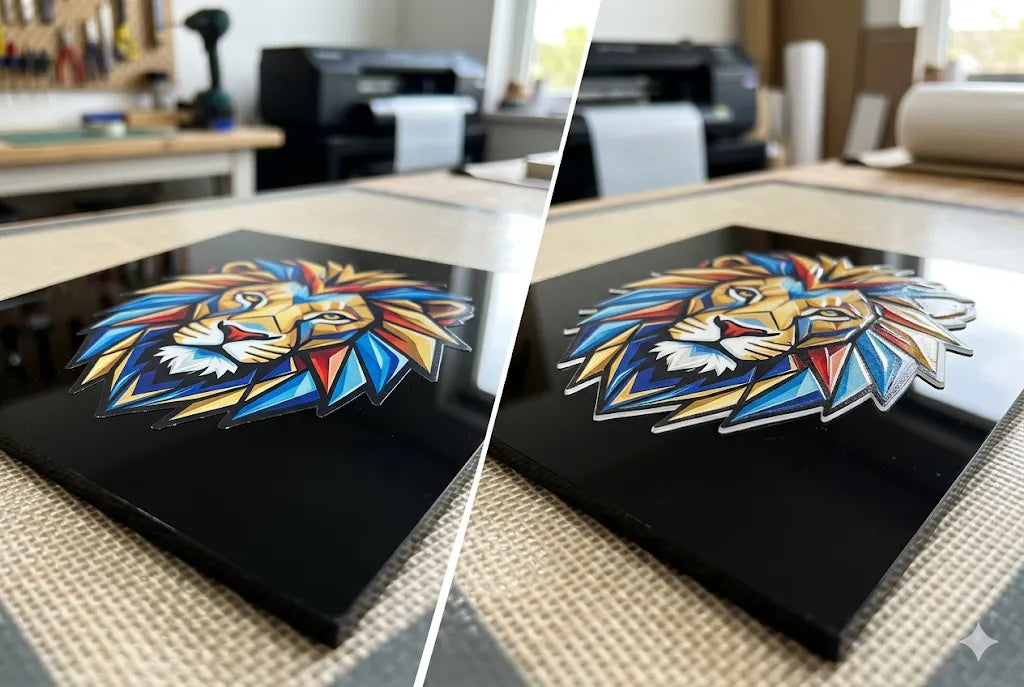
3d uv dtf vs UV DTF comes down to feel, thickness, and use. Standard UV DTF creates full-color decals for hard surfaces. 3d uv dtf adds a raised, textured finish that you can feel with your fingers. Same family. Different finish.
If you want hard surface decals for cups, jars, bottles, acrylic signs, boxes, or product packaging, both can work. If you want a raised logo, badge, icon, or product mark that feels more dimensional, 3d uv dtf printing is usually the better pick. For help choosing the right transfer type for your product, start with DTF West Coast and match the finish to the surface before you order.
3D UV DTF vs. UV DTF
3D UV DTF vs. UV DTF is a common question because both options look similar online. In person, the difference is easier to feel.
|
Feature |
Standard UV DTF |
3D UV DTF |
|
Finish |
Smooth decal feel |
Raised textured feel |
|
Best use |
Logos, labels, decals |
Badges, icons, premium product marks |
|
Surface type |
Smooth hard surfaces |
Smooth hard surfaces |
|
Application |
Pressure applied |
Pressure applied |
|
Main difference |
Flat visual finish |
Raised tactile finish |
|
Standard UV DTF is good for general product decals. 3D effect UV DTF is better when the design needs touch, texture, or more shelf presence. |
What Is Standard UV DTF?
Standard UV DTF is a hard surface transfer method. UV means ultraviolet. Direct to Film means the design is printed on film first, then transferred to the item.
It is not the same as Fabric Direct to Film, which is used for shirts and hoodies with a heat press. UV DTF is made for hard goods. Think glass cups, plastic bottles, acrylic signs, coated metal, sealed wood, phone cases, and product boxes.
The best results come from clean artwork, a smooth surface, and careful pressure during application. Dust, oil, moisture, and rough texture can mess with adhesion. Tiny things matter here. Annoying, but true.
What Is 3D UV DTF?
What is 3D UV DTF? It is a raised version of UV DTF made to give the design more texture. The decal sits higher on the surface, so logos and graphics feel more like a molded detail than a flat sticker.
This can work well for short brand marks, product names, icons, badges, limited-run labels, and packaging accents. It is less ideal for long ingredient lists, legal text, or tiny barcodes because the raised texture can make small information harder to read.
We have seen buyers get excited about raised decals, then try to fit a whole paragraph on a tiny jar. Please do not do that. Keep 3D work bold, clean, and easy to read.
How Does 3D UV DTF Printing Technology Work?
3D UV DTF printing technology uses layered printing, UV curing, film transfer, and pressure application. The artwork is built on film before it goes onto the product.
The raised feel can come from how the layers are built, cured, and transferred. Some workflows also use flexible film materials, including TPU-based layers, to help support texture and movement.
That sounds technical. The simple version: the print is built like a tiny layered cake, then moved onto your product. If the file is weak, the cake still comes out weird. So start with clean artwork.
Where Does TPU Fit In?
TPU UV DTf printing refers to workflows that use thermoplastic polyurethane, or TPU, in the film or transfer structure. TPU is known for flexibility. In some raised UV DTF work, that flexibility can help the transfer handle curve, touch, or texture better than a stiff layer.
This does not mean TPU is right for every job. A smooth acrylic sign behaves differently from a curved tumbler. A sealed box behaves differently from a rubbery phone case. Test when the surface is new or the order is large.
UV DTF Printing Differences That Matter Before Ordering
The biggest UV DTF printing differences are not only about looks. They affect where the transfer should be used.
|
Question |
Choose Standard UV DTF |
Choose 3D UV DTF |
|
Need a basic product decal? |
Yes |
Maybe |
|
Want a raised logo? |
No |
Yes |
|
Need long text? |
Better choice |
Not ideal |
|
Need a badge feel? |
Maybe |
Better choice |
|
Applying to curved items? |
Test first |
Test first |
|
Printing for fabric? |
No |
No |
|
The big rule: UV DTF is for hard surfaces. Apparel needs fabric DTF. Shirts and jars are not the same world. |
When Should You Use 3D UV DTF Transfers?
3D UV DTF transfers make sense when the design is short, visual, and meant to be noticed. Logos, icons, product marks, launch labels, and small brand badges work well.
A Seattle coffee shop could use raised cup logos for a summer drink drop. A Portland candle maker could add raised scent names to jars sold near Hawthorne or Mississippi Avenue. A Tacoma gym could use bottle decals for a member challenge. A Menlo Park startup could add raised marks to sample kits for a launch meeting.
That is where 3D shines. Small detail. Big feel.
Are 3D UV DTF Stickers Good for Packaging?
3d uv dtf stickers can be useful for packaging when the design is simple. Product boxes, sample kits, candle jars, bottles, acrylic tags, and gift packaging can all benefit from a raised brand mark.
For textured UV DTF printing, less is often better. A small raised logo on a box can look clean. A huge raised paragraph on the same box can feel busy.
“Good packaging does not shout. It gives the buyer one clear reason to look closer.”
That line has saved more designs than we can count.
What Surfaces Work Best?
Both standard and 3D UV DTF need smooth, clean, dry surfaces. Glass, acrylic, plastic, coated metal, ceramic, sealed wood, bottles, jars, cups, and finished product boxes are common choices.
Avoid rough, oily, dusty, wet, rubbery, or heavily textured surfaces unless you test first. Curved products need care too. A wide decal may wrinkle on a small bottle. A smaller centered mark may look cleaner.
West Coast makers often deal with product variety. Cups one week. Jars the next. Then boxes. Measure each item instead of guessing.
Which Option Looks Better?
That depends on the job. uv dtf vs 3d uv dtf is not about one being better for every buyer.
Use standard UV DTF when you need clean labels, general decals, clear text, or a smooth finish. Use 3D UV DTF when the design needs touch, texture, and a raised product feel.
For retail packaging, a mix can work. Use a standard for small text. Use 3D for the logo. Clean. Balanced. Not overdone.
Local West Coast Examples
In Tukwila, businesses near Westfield Southcenter, Andover Park, Interurban Avenue, and Tukwila International Boulevard may use UV DTF for event gifts, staff bottles, or packaging labels.
In Seattle, makers in Capitol Hill, Ballard, SODO, Georgetown, Fremont, and the University District may need cup decals, jar marks, laptop stickers, or pop-up product labels.
In Portland, sellers near Hawthorne, Alberta Arts District, Pearl District, and Waterfront Park may use raised decals for market-ready jars, boxes, and small gifts. In the Bay Area, brands in Menlo Park, Palo Alto, San Jose, Oakland, and Redwood City may use them for launch samples, team gifts, or customer kits.
How to Prepare Artwork Before You Order
Use clean artwork at the final size. Avoid screenshots. Check spelling, dates, QR codes, website links, and social handles. Keep small text readable.
For curved items, print a paper mockup first. Cut it out. Place it on the product. If the paper version looks too wide, the transfer will likely feel worse.
Use strong contrast. Navy on black can disappear. Red on pink can get muddy. White outlines can help, but only when they fit the design.
Common Mistakes We See
Here is the short list.
- Using UV DTF on fabric.
- Ordering a wide decal for a narrow bottle.
- Uploading blurry artwork.
- Using tiny text on raised transfers.
- Applying decals to dusty or oily surfaces.
-
Forgetting to test one item before a large run.
Simple mistakes. Costly results. Better to catch them before production.
How Do You Choose Between Standard and 3D?
Start with the product. Then choose the finish.
If the item needs clear text, a smooth label, or general branding, standard may be enough. If the item needs a raised logo, badge, or touchable design, 3D may fit better.
Ask yourself one thing: will texture help the buyer understand the product, or will it just add noise? That question keeps the design honest.
Bring Your 3D UV DTF Project to DTF West Coast
If you are planning hard surface decals for cups, bottles, jars, packaging, signs, or product samples, choose the transfer type that matches your surface and design. DTF West Coast can help West Coast buyers order the right fit, from standard decals to raised transfer options for branded products.
Start with the product, measure the surface, prep your artwork, then place the order with confidence.
FAQ
What is the main difference between 3D UV DTF and UV DTF?
The main difference is texture. Standard UV DTF is smoother. 3D UV DTF has a raised feel.
What is 3D UV DTF used for?
It is used for raised decals on hard surfaces like cups, bottles, jars, acrylic signs, product boxes, and packaging.
Is standard UV DTF better for small text?
Yes. Standard UV DTF is often better for small text, long labels, QR codes, and smooth product decals.
Can I use 3D UV DTF on shirts?
No. Use fabric DTF for shirts, hoodies, totes, and apparel. UV DTF is for hard surfaces.
What is TPU UV DTF printing?
It is a UV DTF workflow that uses TPU-based film or layers to support flexibility and raised texture.
Are 3D UV DTF stickers waterproof?
They can handle moisture on the right surface, but care matters. Test first for drinkware, washing, or heavy handling.
Which surfaces work best?
Smooth hard surfaces work best, such as glass, acrylic, plastic, coated metal, ceramic, sealed wood, cups, bottles, and jars.
Which should I choose for packaging?
Use standard UV DTF for small text and smooth labels. Use 3D UV DTF for raised logos, badges, and product marks.
Conclusion
3D UV DTF vs. UV DTF is not a hard choice once you know the job. Standard UV DTF is best for smooth, hard-surface decals and readable labels. 3D UV DTF is best when the design needs raised texture and a stronger product feel. Keep the artwork clean, match the finish to the surface, and test when the product shape is new. That is the smart path.
Share:
3D UV DTF Printing: What It Is, How It Works, and When to Use It for Raised Stickers, TPU Transfers, and Hard Surface Branding
How to Design Custom 4th of July Shirts