Your logo is the one design you'll print over and over. On staff shirts. On hats. On the tote bags you hand out at a farmers market. So it has to look right every single time, not just on the first run.
That's where custom logo DTF transfers come in. They print sharp, full color logos you can press on almost any fabric, in any quantity. But a few small choices make a big difference. File type. Size. Where it goes on the shirt. Let's walk through them.
Why Businesses Use DTF Transfers for Logos
Think about the old options. Screen printing is great for big runs, but you pay setup fees for every color. Embroidery looks classy, but tiny text and gradients don't stitch well. Vinyl means cutting and weeding every little letter by hand.
DTF skips most of that. The whole logo prints at once, every color, every detail. No screens. No minimums. Need 12 shirts this week and 30 more next month? Same price per print, same look. Each DTF logo transfer comes out just like the last one.
A few more reasons logo DTF transfers work so well for small businesses:
- Any fabric: cotton, polyester, blends, canvas, even nylon jackets with the right settings.
- Any color shirt: a white base layer keeps your brand colors true on black or navy.
- Soft feel: the print bends with the fabric, so a chest logo doesn't feel like a sticker.
- Easy reorders: keep a stack of prints on hand and press shirts as new hires show up.
- Room to grow: custom apparel logo transfers go on tees today and hoodies, aprons, or jackets next season.
Start With the Right Logo File
Bad file in, bad print out. This is where most logo problems start.
Use a PNG With a Transparent Background
Your logo file should be a PNG with no background. If there's a white box around it, that box prints too. Yep, the whole box. A JPG can't be transparent, so skip it.
Go for 300 DPI at Full Size
Size the file at the actual print size, then set it to 300 DPI. A 3.5 inch chest logo should be 1050 pixels wide. Grabbing your logo from your website or a social media profile usually gives you a tiny, blurry version. Ask your designer for the original instead. Our guide to DTF file requirements covers this in more detail.
Vector First, Then Export
If you have an AI, EPS, SVG, or PDF version of your logo, that's gold. Vector files scale up or down with no fuzzy edges. Export a fresh PNG from the vector at each size you need.
Logo Sizes and Placement
Where your logo goes matters as much as how it looks. Here are common spots and sizes we see for logo transfers for shirts and other gear:
| Placement | Typical Width | Good For |
|---|---|---|
| Left chest | 3 to 4 inches | Staff shirts, polos, uniforms |
| Full front | 10 to 12 inches | Merch, events, brand tees |
| Full back | 11 to 13 inches | Work crews, food trucks, teams |
| Back of neck | 2 to 3 inches | Small brand mark, website |
| Sleeve | 2.5 to 3.5 inches | Second logo or icon |
| Hat front | 2 to 4 inches | Caps and trucker hats |
| Tote bag | 8 to 10 inches | Giveaways and retail bags |
A popular combo: logo on the left chest, website or phone number across the upper back. People see the chest when you face them and the back when you walk away. Both work for you.
Always measure your blank first. A youth shirt or a fitted women's tee may need a smaller print than a men's XL.
Tips for Small Text and Fine Lines
Lots of logos have a tagline or a "Since 2009" in tiny letters. Those are the parts that can get lost. A few rules we follow:
- Keep text at least a quarter inch tall when printed. Smaller than that and letters start to blur together.
- Keep thin lines at least about 1 millimeter thick. Hairlines can break up after pressing.
- Thin script fonts look great on screen and rough on fabric. If your logo uses one, make a "small size" version with a bolder font.
- Skip faint drop shadows and soft glows. They turn into a fuzzy halo.
Plenty of big brands have two logos: a full one and a simple one. Do the same with your custom DTF logo transfers. The full version goes on backs and totes. The simple mark goes on chests, sleeves, and hats.
Getting Brand Colors Right
Your brand red should look like your brand red. Here's how to get close:
- Send your brand colors: include the hex or Pantone codes in your order notes.
- Check on a real print: screens glow, fabric doesn't. A bright screen blue often prints a bit darker.
- Use our color chart: our DTF color chart shows how real colors print, so you can pick the closest match.
- Think about the shirt: a navy logo on a navy shirt disappears. Add a white outline or pick a lighter blank.
Dark shirt or light shirt? Our guide on transfers for dark and light garments walks you through it.
DTF vs Other Logo Methods
| Method | Best For | Watch Out For |
|---|---|---|
| DTF | Full color logos, small runs, mixed fabrics | Very tiny text under a quarter inch |
| Screen printing | Huge runs of one or two color logos | Setup fees per color |
| Embroidery | Polos, caps, a classic look | Fine detail and gradients |
| Vinyl | Simple one color shapes | Weeding time, small letters |
Plenty of shops mix methods for their business logo transfers. Embroidered caps, DTF tees. Totally fine. Just keep the logo file the same so everything matches.
Ordering Logo Transfers on a Budget
Here's where business logo DTF transfers get really cost friendly.
One Logo, One Size
If you just need one design, upload it on our custom image transfers page and pick your size. That's the fastest route for custom DTF transfers for shirts.
Lots of Logos on One Sheet
This is the money saver. A gang sheet lets you fill one big sheet with chest logos, back prints, sleeve icons, and hat marks, all at once. Build yours in the gang sheet builder, or upload a finished layout on the custom gang sheet page. Our post on prepping multiple logos for a gang sheet shows how to lay it out without wasting space.
Test Before You Commit
Not sure how your logo will print? Grab a DTF sample pack first. You can feel the print and see the colors before you order a big batch.
Logo Mistakes We See All the Time
We print a lot of logos. Same few problems keep popping up, and almost all of them are easy to fix before you order.
The Mystery White Box
Someone sends a logo saved off a website. Looks fine on screen. Then it prints with a white rectangle behind it, and on a black shirt that's pretty hard to miss. Fix: always use a PNG with a see through background.
The Stretched Logo
A file gets dragged wider to "fill the space," and now the round logo is an oval. People notice, even if they can't say why. Fix: resize by holding Shift, or type in the width and let the height follow.
The Pixel Party
A 200 pixel logo blown up to 11 inches looks like a video game from 1990. Fix: start from the biggest, cleanest file you've got, ideally a vector.
Wrong Size for the Blank
A 12 inch logo on a toddler shirt wraps around the sides. A 3 inch logo on a 3XL hoodie looks lost. Fix: measure the actual blank, and make a couple of sizes if your team runs from small to big.
None of these cost much to fix. They just cost a lot when you find out after 50 shirts are pressed.
Who Uses Custom Logo Transfers?
Pretty much anyone with a name to show off. A few examples of who orders custom logo transfers on the West Coast:
- Coffee shops in Seattle and Portland dressing their baristas.
- Food trucks in Los Angeles that want a big back logo customers can spot in a line.
- Landscaping and construction crews who need tough, washable work shirts.
- Gyms, dance studios, and youth sports clubs.
- Breweries and wineries selling merch in their tasting rooms.
- Real estate teams and small offices handing out branded hoodies.
Say you own a small taco truck in San Diego. You could order one gang sheet with ten big back logos for staff, twenty chest logos for merch shirts, and a row of small hat logos. One order. One shipment. Every piece matches.
And if you sell blanks or run a print shop yourself, January is a good time to stock up and look at new gear. The Impressions Expo Long Beach runs January 21 to 23, 2027, at the Long Beach Convention Center. It's a big one for decorated apparel folks.
How to Press Logo Transfers
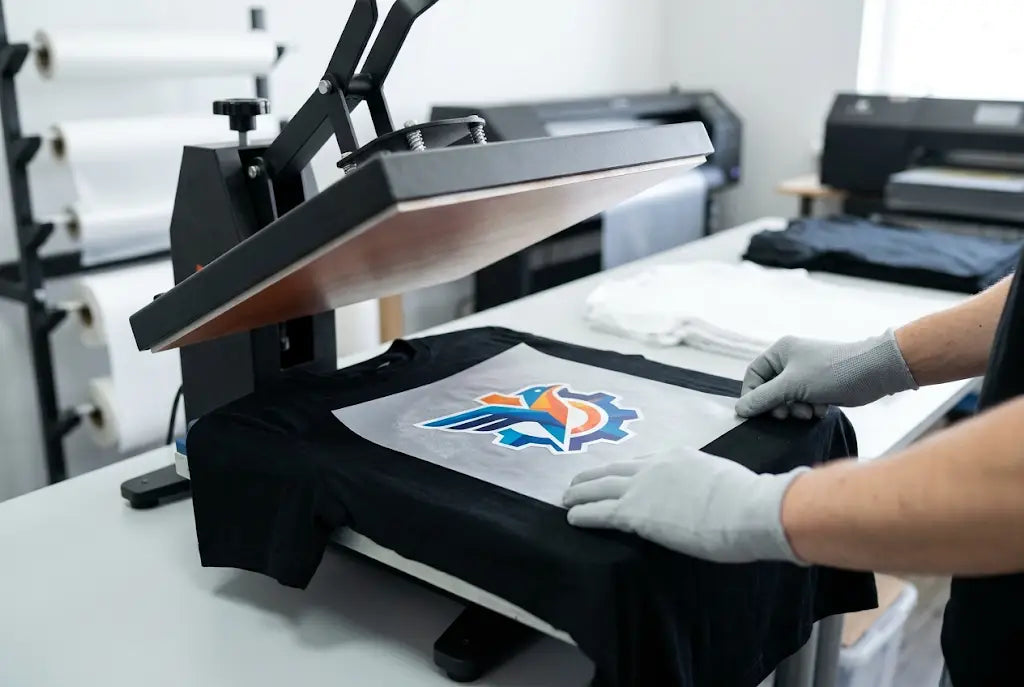
Good news: custom DTF transfers ready to press don't need much gear. A heat press, a Teflon sheet or parchment, and your blank.
- Prepress the shirt for 3 to 5 seconds to get rid of moisture and wrinkles.
- Line up the logo. For a left chest, the top usually sits about 7 to 9 inches below the shoulder seam on adult shirts.
- Press at 300 to 320°F for 10 to 15 seconds with firm pressure.
- Peel while hot.
- Cover with parchment and press again for 5 seconds to lock it in.
Logo heat press transfers like these work on hats too, with a hat press or a curved platen. Tell your staff to wash shirts inside out in cold water. Our guide on washing DTF printed shirts has the full care steps.
Frequently Asked Questions
What are custom logo DTF transfers?
They're your logo printed on special film with a heat activated adhesive. You press them onto shirts, hats, bags, and more.
What file should I send for my logo?
A PNG with a transparent background at 300 DPI, sized to the print size you want.
How big should a left chest logo be?
About 3 to 4 inches wide for most adult shirts.
Can I order just a few logo prints?
Yes. There's no minimum, so you can order one print or a hundred.
Will my brand colors match exactly?
They'll be close. Send your color codes, and check our color chart for the best match.
Can DTF print small text in my logo?
Yes, but keep letters at least a quarter inch tall and lines about 1 millimeter thick for clean results.
Do logo transfers work on polyester and blends?
Yes. DTF works on cotton, polyester, and blends, plus canvas and some nylon.
Can I put several logos on one order?
Yes. A gang sheet lets you fit many logos and sizes on one sheet to save money.
How long do logo prints last?
About 100 washes when pressed right and washed inside out in cold water.
Can I use DTF logos on hats?
Yes. Use a hat press or curved platen, and keep the logo about 2 to 4 inches wide.
Make Your Logo Work Harder
A logo on a shirt is free advertising every time someone wears it. Get the file right, pick smart sizes, and keep a simple version for small spots. Questions about your logo order? Check our FAQ page or reach out to our team.
Share:
American Flag DTF Transfers for Veteran Appreciation Apparel