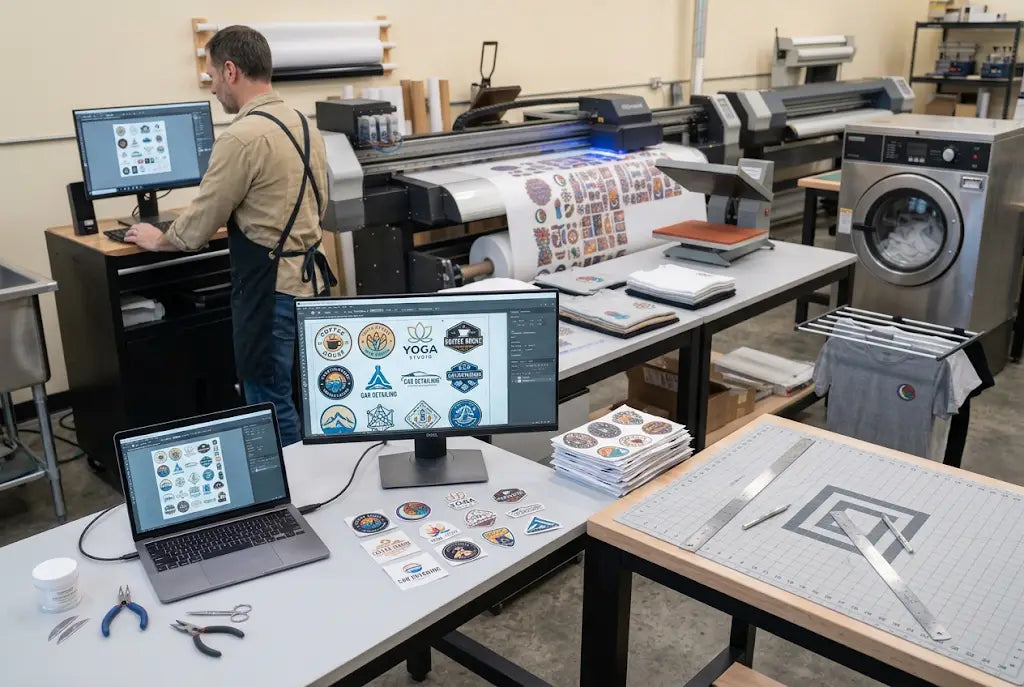
A DTF gang sheet works best when every logo is cleaned, sized, grouped, and arranged before the sheet is ordered. Start with approved logo files, remove hidden backgrounds, set each design to its final print size, leave cut space between logos, and place larger logos first. Then use the remaining space for smaller approved marks like sleeve logos, pocket logos, neck labels, or reorder graphics.
For West Coast print shops, creators, schools, teams, and apparel brands, clean logo prep saves time at the press table. DTF West Coast helps customers turn multiple logo files into ready-to-press custom transfers without making the layout feel like a puzzle from hell.
How to Build a Custom DTF Gang Sheet with Multiple Logos
A DTF gang sheet should be built from final-size logo artwork, not rough mockups.
A custom DTF gang sheet gives you control over logo sizes, quantities, placement, and reorder planning.
A DTF gang sheet builder helps upload, size, duplicate, arrange, and preview multiple logos before ordering.
A multiple-logoDTF gang sheet should group related logos so cutting and sorting stay simple.
A good DTF gang sheet file setup prevents blurry prints, hidden boxes, wrong sizes, and wasted sheet space.
Why Multiple Logos Need Care Before Printing
Multiple logos sound easy. Upload them, arrange them, done.
Then one logo has a white box. Another is low resolution. One is supposed to be 4 inches wide, but it lands at 3.6. A sleeve logo gets mixed with a back print. Suddenly, the sheet is not saving time anymore.
That is why logo prep matters. A clean sheet starts before the builder opens. It starts with files that are approved, sized, named, and ready.
What Is a DTF Gang Sheet?
A DTF gang sheet is one larger Direct to Film transfer sheet that holds several designs in one layout. After printing, the designs are cut apart and heat-pressed onto garments.
For logos, this is useful because one order may include several placements.
What logo types can go on one sheet?
A sheet can include left chest logos, full front marks, back logos, sleeve logos, neck labels, sponsor logos, brand icons, team marks, staff shirt logos, and small reorder designs.
Why businesses use it
Businesses use gang sheets to keep multiple logo sizes in one place, reduce blank film space, support repeat orders, and make production easier to cut and sort.
What Is a Custom DTF Gang Sheet?
A custom DTF gang sheet is built from your own artwork and your own layout choices.
You decide which logos go on the sheet, how many copies you need, what size each logo should be, and how the artwork is grouped. This is helpful for businesses that need logos for shirts, hoodies, uniforms, bags, and branded merch.
When custom sheets make sense
Use custom sheets when you have different logo sizes, several brands, multiple garment placements, or a repeat customer order.
When to keep it simple
If you only need one logo in one size, individual transfers may work. If you need several logos or sizes, a gang sheet is usually easier.
DTF Logo Gang Sheet Planning
A DTF logo gang sheet should be planned around real garment use.
Do not size a logo only by how it looks on your screen. A 3-inch logo may look fine in design software and too tiny on a hoodie. A 12-inch logo may work on a back print but feel huge on a youth shirt.
|
Logo Placement |
Common Use |
Planning Tip |
|
Left chest |
Staff shirts and polos |
Keep simple and readable |
|
Full front |
Brand shirts and events |
Center the main logo |
|
Full back |
Hoodies and team apparel |
Use bolder artwork |
|
Sleeve |
Teams and sponsors |
Keep detail minimal |
|
Neck label |
Brand apparel |
Use clean, small text |
|
Pocket mark |
Minimal merch |
Avoid thin lines |
Logo DTF Transfers for Apparel Orders
Logo DTF transfers are useful for brands, schools, gyms, restaurants, teams, creators, and print shops that need repeat marks across different garments.
A coffee shop may need left chest logos for staff shirts. A school may need a mascot logo in three sizes. A Los Angeles brand may need front marks, sleeve hits, and neck labels for a drop.
Keep logo sizes consistent.
If the left chest logo is 3.5 inches wide on one shirt, keep it 3.5 inches wide across the matching order unless the garment size truly needs a change.
Use bold versions for small prints.
Small logos need thicker lines and cleaner shapes. Tiny text can fail fast.
Custom Logo DTF Transfers for Brands
Custom logo DTF transfers help brands stay flexible.
You can press logos on shirts, hoodies, tote bags, workwear, team apparel, and event merch. You can also test new logo placements without ordering a huge run.
Brand consistency matters
Use the same logo file, color version, and size standards for repeat orders. Otherwise, every batch starts to look slightly different. Customers notice that stuff.
Save your approved layout.
Once a logo sheet works, save it with the customer name, date, sheet size, and logo sizes.
Multiple Logos DTF Gang Sheet Workflow
A multiple-logo DTF gang sheet should not feel random.
Group by customer, garment placement, or production order. Put large logos first. Add medium logos next. Use small approved logos in the open gaps.
Simple workflow
-
Collect approved logos.
-
Remove hidden backgrounds.
-
Set each logo to final print size.
-
Place large logos first.
-
Group related logos together.
-
Add small logos in useful gaps.
-
Leave room for cutting.
-
Preview before ordering.
How to Make a DTF Gang Sheet:
How to make a DTF gang sheet starts with the final artwork, not the sheet size.
Set every logo to the size you want it printed. Then choose a sheet size that fits the real layout. Do not stretch logos to fill space. Do not shrink important text just to squeeze in one more mark. That is how good artwork turns awkward.
Put the biggest logos down first.
Large back prints and full front marks control the sheet. Place them first, then work smaller logos around them.
Use gaps with purpose.
Sleeve marks, pocket logos, neck labels, and small reorder logos are good gap fillers.
How to Build a DTF Gang Sheet With a Builder
How to build a DTF gang sheet is easier when you use a visual tool.
A DTF gang sheet builder lets you upload logo files, set sizes, duplicate designs, rotate artwork, arrange the sheet, and preview the layout before ordering.
Why the preview matters
The preview can catch missing copies, wrong sizes, crowded logos, and wasted film space before production.
Builder limit
A gang sheet builder cannot fix a blurry logo. If the file is low resolution, it will still print low resolution. Annoying, but true.
How to Arrange Designs on a Gang Sheet
How to arrange designs on a gang sheet comes down to flow.
Think about the person cutting the sheet. Think about the person pressing the garments. Think about the person packing the order. If the layout makes life harder for all three, change it.
Group smart
Put one customer’s logos together. Keep left chest logos in rows. Keep sleeve marks together. Put neck labels in narrow open spaces.
Avoid overpacking
A sheet that is too tight can damage transfers during cutting. Space is not always waste. Sometimes space protects the job.
DTF Gang Sheet File Setup
DTF gang sheet file setup should be checked before uploading.
Use high-resolution PNG files when possible. Keep backgrounds transparent where needed. Remove white boxes, rough edges, stray pixels, and hidden layers. Make sure every logo is at final print size.
File naming helps
Name files clearly. Use customer name, logo size, placement, and date. Boring names save real time later.
DTF Gang Sheet Artwork Setup
DTF gang sheet artwork setup means checking the artwork itself, not just the layout.
Look at edges, color contrast, text thickness, file resolution, and design shape. Logos that look fine as large graphics may need simplified versions for pocket or sleeve prints.
Check logo color against garment color.
A black logo on a navy hoodie may disappear. A white logo on a cream tee may look weak. Test the design visually before ordering.
Common Logo Prep Mistakes to Avoid
The biggest mistake is using files that are not truly final.
Another common one is mixing customer artwork without grouping it. That turns cutting day into a guessing game. Nobody wants that.
“Clean files make clean sheets. Clean sheets make calmer production.”
Simple rule. Very real.
Watch for these problems.s
Avoid screenshots, stretched logos, tiny text, hidden white backgrounds, uneven duplicate sizes, poor file names, and logos placed too close to each other.
Multiple Logo Gang Sheets for West Coast Businesses
West Coast businesses move fast.
Seattle schools need mascot logos. Portland makers need market merch. Los Angeles brands need sleeve marks and neck labels. San Diego teams need sponsor logos. Bay Area startups need staff apparel before launch week.
The U.S. Census Bureau’s Business Formation Statistics provide timely information on new business applications and formations in the United States. That matters because new businesses often need logos for uniforms, merch, launch apparel, and events.
Prepare Logo Gang Sheets With DTF West Coast
A strong DTF gang sheet starts with approved logos, final sizing, clean backgrounds, smart grouping, and enough space to cut.
DTF West Coast helps West Coast creators, print shops, schools, teams, and apparel brands build logo gang sheets, upload custom layouts, use builder tools, and order ready-to-press logo transfers for real production needs.
FAQ
What is a DTF gang sheet for logos?
A DTF gang sheet for logos is one transfer sheet that holds multiple logo designs, sizes, and placements for cutting and heat pressing.
What is a custom DTF gang sheet?
A custom DTF gang sheet is a sheet built from your own artwork, with your chosen logo sizes, quantities, and layout.
How does a DTF gang sheet builder help with logos?
A DTF gang sheet builder helps you upload, size, duplicate, arrange, rotate, and preview logo files before ordering.
What are logo DTF transfers?
Logo DTF transfers are custom Direct to Film transfers made from logo artwork for shirts, hoodies, uniforms, bags, and merch.
Can I use custom logo DTF transfers for multiple garments?
Yes, custom logo DTF transfers can be prepared in different sizes for shirts, hoodies, sleeves, bags, labels, and workwear.
How do I make a multiple-logo DTF gang sheet?
A multiple-logo DTF gang sheet starts with approved artwork, final print sizes, grouped placement, cut room, and a checked preview.
What should DTF gang sheet file setup include?
DTF gang sheet file setup should include high-resolution artwork, transparent backgrounds, final sizing, clean edges, and enough space between designs.
What is the best DTF gang sheet artwork setup?
DTF gang sheet artwork setup should include clean logo files, readable text, good contrast, proper sizing, and smart grouping by customer or placement.
Conclusion
Preparing multiple logos for one gang sheet is not about squeezing everything together.
It is about making the sheet easy to print, cut, press, and reorder. Clean the files. Set final sizes. Place large logos first. Group related artwork. Leave cut room. Then save the layout for the next run.
Share:
Wholesale DTF Gang Sheets Explained
UV DTF Transfers on Tumblers: Complete Application Guide