What Is Hyper Color 9 Version?
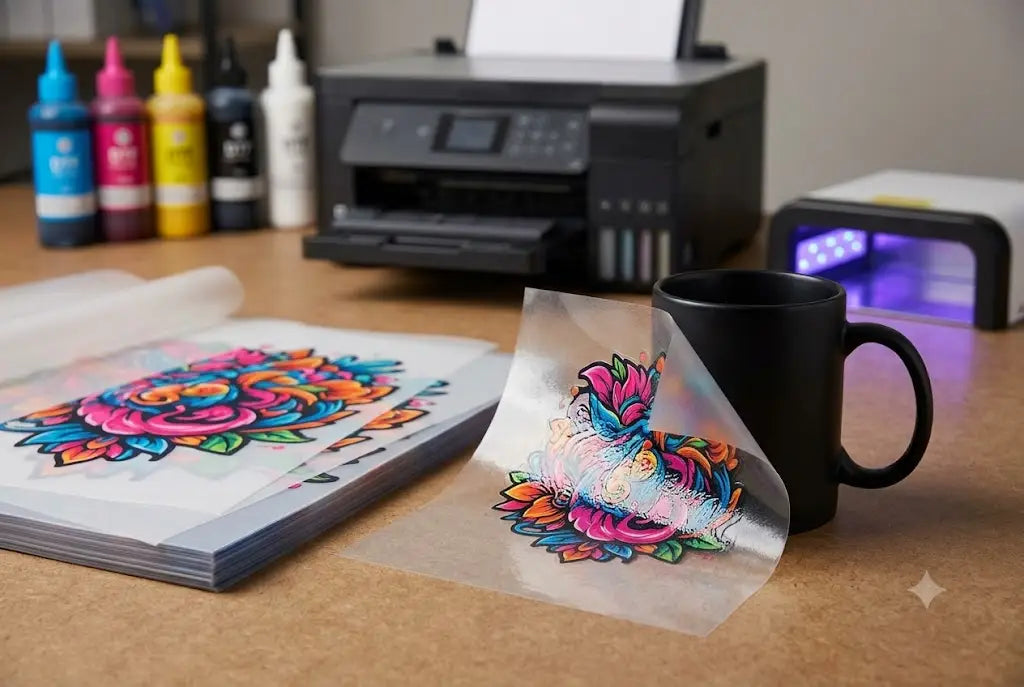
Hyper Color 9 Version refers to a 9-color extended gamut DTF printing setup that uses CMYK inks plus four additional color channels, Red, Green, Blue, and Orange (RGBO), along with a White underbase. Standard DTF printing uses 5 ink channels. The 9-color setup adds four more to produce colors that a standard CMYK system physically cannot reproduce, deeper reds, brighter oranges, richer greens, truer blues, accurate skin tones, and smoother gradients.
For buyers, the result is a transfer print that more closely matches what the artwork looks like on screen. For brands, that means color accuracy that protects brand identity. For product sellers, it means labels and decals that look polished on the shelf, not washed out in print.
The Color Problem Standard DTF Printing Can't Solve
To understand why Hyper Color 9 matters, you have to understand why standard CMYK printing struggles with certain colors, and why that struggle matters for your artwork specifically.
Standard DTF printers use five ink channels: Cyan, Magenta, Yellow, Black, and White (CMYK+W). The white ink lays down as a base layer on dark fabrics. The four CMYK inks mix to produce every other color in the design. This works reliably for the majority of artwork, flat logos, bold text, two-color graphics, basic illustrations.
The problem appears when artwork includes colors that sit outside what CMYK can mix accurately. Standard 5-color CMYK+White printing covers approximately 55% of the Pantone Matching System. Extended gamut 9-color systems, which add Red, Green, Blue, and Orange ink channels, bring that coverage to over 95% of the Pantone Matching System, roughly 73% more Pantone coverage.
That gap, 55% vs. 95%, is where the color problem lives.
Even the most advanced standard printing systems cannot reproduce every color seen in an image. While the color standard a printer uses significantly impacts its color gamut, the basic ink colors used for mixing also play a crucial role in determining the range of colors it can produce.
The colors that fall into that gap include:
- Vivid oranges: The most common color CMYK cannot hit. CMYK builds orange by mixing yellow and magenta, which produces a dull, brown-tinged result compared to the screen preview.
- Deep reds: CMYK red skews pink or maroon depending on the ratio. A brand red that looks correct on screen often prints muddy on standard DTF.
- Rich greens: CMYK green is produced by mixing cyan and yellow. The result tends toward olive or lime rather than the saturated greens used in environmental branding, sports teams, and produce imagery.
- Brilliant blues: Royal blue, cobalt, and electric blue frequently shift toward purple or teal under standard CMYK mixing.
- Skin tones: Portrait artwork and designs featuring faces are the most demanding test of CMYK accuracy. Mismatched skin tones in a mascot, illustration, or photo transfer are immediately visible.
- Smooth gradients: Gradients that blend between two colors CMYK struggles with often show banding, visible bands of color where the transition should be smooth.
If your artwork contains any of these elements, the gap between your screen preview and your printed transfer using a standard 5-color setup can be significant. The 9-color setup closes that gap.
How the 9-Color System Works: The Science in Plain Language
The 9-color ORGB system integrates CMYK inks (Cyan, Magenta, Yellow, Black) for standard color printing, ORGB inks (Orange, Red, Green, Blue) for expanded color vibrancy, and a white base layer to enhance brightness on dark fabrics.
Think of it this way. A standard color wheel mixed from only four ingredients can produce many colors but cannot reach every point on the wheel. Adding four more pure color sources gives the mixing system direct access to shades it previously had to approximate, sometimes poorly.
The 9-color DTF system uses the latest Epson i3200 printheads, allowing for RGB + CMYK + orange and green printing, which means more vibrant, true-to-life colors.
The RIP (Raster Image Processor) software manages the color channels automatically. No artwork changes or heat press adjustments are required, it is a drop-in improvement. The RIP software your supplier uses handles all color conversion and channel separation automatically. You submit your artwork in the best quality format you have, PNG at 300 DPI, vector PDF, or EPS, and the print system handles the rest.
Hyper Color is perfect for Pantone (PMS) color reproduction and prevents color shifts that typically occur when a PNG file is printed in a restrictive CMYK color space. The result is amazingly accurate reproduction of outstanding oranges, rich reds, glowing greens, and brilliant blues while retaining refined skin tones and smooth color transitions.
One critical file note for 9-color printing: Do not provide files using CMYK colors for Hyper Color DTF transfers. Only use RGB or Pantone PMS. Submitting a CMYK file to a 9-color system forces it to work backward, it converts CMYK values to extended gamut output, which undercuts the accuracy the system is designed to provide. Submit in RGB or Pantone PMS and let the RIP do its job.
5-Color vs. 9-Color DTF: Which One Does Your Design Actually Need?
Not every design benefits from 9-color printing. Choosing the right system for the right design is how you get the best result at the right cost.
Use standard 5-color (CMYK+W) for:
- Simple vector logos with flat, solid color fills
- Black and white or grayscale designs
- Text-heavy graphics where color accuracy is not the primary concern
- Designs using only 1 to 3 colors
- High-volume team orders, school shirts, and basic branded apparel where the design is straightforward
- Any design where the artwork was built in CMYK and exact color matching is not a priority
Stick with standard 5-color for solid vector art and high-volume team orders. It is perfect for school gear, promotional shirts, and basic brand logos that do not feature complex gradients. You will maintain high margins while providing a product that withstands 50-plus washes without cracking.
Use 9-color (CMYK+RGBO+W) for:
- Brand colors that must match specific Pantone or RGB values, particularly oranges, reds, greens, and royal blues
- Photographic or portrait artwork, any design featuring faces, skin tones, or detailed product photography
- Full-color illustrations with layered shadows, highlights, and color transitions
- Gradient-heavy designs where smooth transitions between colors matter
- Designs where the screen preview and the printed result must be as close as possible for customer approval or product photography
- Product labels, packaging decals, and retail items where color is part of brand recognition
- Seasonal and limited edition artwork with complex color palettes
The 9-color setup shines when your design needs accuracy, portraits, branding, full-color illustrations, and anything with tricky blends or subtle tones.
The practical test: Open your artwork file. If any major color in the design is an orange, a red, a rich green, a royal blue, or a skin tone, and that color must look correct to your customer, 9-color is the right choice. If the design is a clean two-color logo or a flat text mark, standard 5-color will handle it without the additional investment.
Hyper Color 9 for Apparel DTF Transfers: What Changes on the Finished Shirt
The visual difference between 5-color and 9-color on a finished garment depends entirely on the design. For the right artwork, it is immediately visible. For simple designs, it is not.
Where 9-color makes a real difference on apparel:
Streetwear and graphic tees with bold palette artwork, Designs built around orange, red, and green, the three colors CMYK struggles with most, print with dramatically more saturation and accuracy on a 9-color system. An orange flame graphic on a black hoodie becomes the difference between a dull rust-brown result and a vivid, true orange.
Portrait and face-based artwork, Custom portrait transfers, mascots with skin tones, and photo-realistic face designs are the clearest test case. Standard CMYK skin tone reproduction often appears slightly green-gray or sallow. The RGBO addition corrects for this, producing the warm, accurate skin tones that make portrait artwork look professional rather than processed.
Team and sports designs with exact brand colors, A university with a specific shade of red, a sports team with a branded green, or a corporate client with a Pantone color standard all have color accuracy requirements that standard CMYK cannot reliably meet. 9-color printing with Pantone PMS file submission handles these jobs with accuracy that prevents client rejection.
Gradient backgrounds and atmospheric artwork, Designs with sky gradients, color washes, glow effects, and atmospheric shading reveal the banding problem most clearly when printed in standard CMYK. The 9-color system produces smooth transitions that hold the integrity of the original design.
What does not change with 9-color: The pressing process, the press settings, the fabric compatibility, and the wash durability are identical to standard DTF. No heat press adjustments are required. It is a drop-in improvement. You press at the same temperature, same time, same pressure, and peel the same way. The only difference is in the color result.
Hyper Color 9 for UV DTF: Hard Surface Decals With Extended Color Accuracy
The same color science that benefits apparel DTF applies to UV DTF transfers for hard surfaces, and in some ways matters even more, because hard surface products are often photographed for ecommerce, displayed at retail, and judged against a brand standard that has to be consistent across packaging, labels, and digital presence.
UV DTF transfers are printed decals for hard goods, glass cups, tumblers, acrylic signs, candle jars, cosmetic bottles, product packaging, phone cases, and branded gifts. They are applied by hand pressure to a clean surface. No heat press required.
Where 9-color UV DTF makes the biggest difference:
Product labels that will be photographed: A skincare brand's bottle label on Etsy or Shopify is competing with professional product photography. If the label color reads differently in person than it does on screen, customers will notice the inconsistency between the listing photo and the product they receive. 9-color UV DTF closes the gap between the RGB color on the screen and the printed color on the jar.
Candle and cosmetic branding: Amber glass jars and frosted bottles are common candle and skincare substrates. Getting the label color to read correctly against those tones requires color accuracy that a standard CMYK decal often cannot deliver. A 9-color system handles the fine tonal distinctions that matter on these products.
Drinkware decals for retail and gifting: Tumblers, wine glasses, and branded cups sold at market tables and in Etsy shops are evaluated by the buyer in person. A decal that looks vibrant and retail-quality in that context converts to a sale. A decal that looks flat or off-color does not.
The raised effect distinction: UV DTF decals, whether 5-color or 9-color, produce a raised surface feel compared to flat paper labels. The design sits on top of the surface with a slightly textured appearance that reads as premium compared to a printed sticker. The 9-color version of this extends the quality comparison further, richer color plus the raised feel produces a result that competes with commercial printed packaging at a fraction of the cost and with no minimum order.
File Preparation for 9-Color Printing: The Non-Negotiable Rules
The extended gamut system can only perform as well as the artwork you submit. These rules apply to every 9-color DTF and UV DTF order.
Submit in RGB, not CMYK. As established above, CMYK files submitted to a 9-color system create an unnecessary conversion step that reduces accuracy. Design in RGB. Export in RGB. Submit in RGB. This is the single most important file preparation step for 9-color work.
300 DPI at actual print size. Resolution is the floor, not a preference. A 300 DPI file scaled up after the fact loses resolution; the DPI drops as the file expands. Set the artwork at the correct final print size at 300 DPI before exporting.
Use PNG for most artwork, vector PDF or EPS for pure logo work. Accepted file types are PDF, EPS, SVG, and PNG. PNG files are preferred. All fonts must be converted to Outline/Curves if using PDF vector files.
Minimum line thickness of 0.5mm. Minimum free-standing line thickness is 6px / 0.02" / 0.5mm. Finer lines can print at the customer's risk. Lines thinner than this may not reproduce cleanly regardless of color system.
Avoid transparencies and glow effects on dark garment orders. Avoid transparencies, glow effects, or gradients that fade into the shirt color when printing onto color shirts. Select the halftone option for these effects.
Check QR codes and text before ordering. Any code, phone number, URL, or social handle that appears in the artwork should be tested at print size before the file is submitted. A QR code that is too small to scan or a URL that contains a typo cannot be corrected after printing.
When Hyper Color 9 Makes Business Sense for West Coast Sellers
The buyers who get the most from 9-color printing are those whose color is doing business for them, where the accuracy of a red, the depth of a green, or the smoothness of a gradient directly affects whether a customer buys, returns, or recommends.
A Seattle coffee shop branding cold cups: The shop's coral-orange logo on a clear plastic cup has to match the brand color on the awning, the Instagram page, and the business card. Standard CMYK will produce a muddy orange. 9-color RGBO will produce the correct shade.
A Portland candle maker labeling glass jars for market: The label needs to photograph well on a white background for Etsy and look correct on a dark amber jar in person. Both requirements demand color accuracy that only an extended gamut system can deliver consistently.
A Tacoma gym branding water bottles for a member challenge: The gym's brand red needs to look correct on a silver stainless bottle. Standard CMYK red shifts. 9-color red holds.
A Menlo Park startup preparing product samples for Sand Hill Road meetings: Sample kits with branded packaging need to look finished and intentional. Muddy or off-color labels undercut the brand perception before a word is spoken.
An Etsy seller shipping personalized tumblers: The customer approved the mockup in RGB on a screen. The decal needs to match. 9-color printing is the system that makes that match possible.
A Seattle streetwear brand running a hoodie drop: The design features a gradient from deep navy to electric blue, two of the colors CMYK handles least accurately. 9-color RGBO delivers the gradient the designer intended.
How to Order Hyper Color 9 DTF or UV DTF Transfers From DTF West Coast
Ordering 9-color transfers follows the same process as standard DTF or UV DTF, with two critical differences at the file stage.
Step 1: Choose the right product. Select apparel DTF for shirts, hoodies, and fabric items. Select UV DTF for cups, jars, bottles, packaging, and hard goods. Do not use UV DTF for fabric. Do not use apparel DTF for hard surfaces.
Step 2: Prepare your file in RGB. Convert to RGB before exporting. Confirm the resolution is 300 DPI at the actual final print size. Convert all fonts to outlines in vector files.
Step 3: Check every element at print size. Zoom to 100% in your design software and check text legibility, line thickness, QR code scannability, and spelling. If it is not clearly legible at 100% on screen at print size, it will not be legible printed.
Step 4: Measure the product or garment. For UV DTF, place a paper mockup on the actual product and confirm size and placement. For apparel, use the standard placement measurements: left chest 3 to 4 inches wide; center chest 6 to 10 inches wide; full back 11 to 13 inches wide.
Step 5: Note the 9-color option in your order. Confirm at checkout or in your order notes that you are ordering the Hyper Color 9 / extended gamut version. Include your artwork, size, and placement details.
Step 6: Press as normal. No changes to your heat press setup are needed. The color improvement is in the print, not in your equipment or process.
Summary
Standard 5-color DTF covers about 55% of the Pantone color spectrum. Nine-color extended gamut DTF covers over 95%. The additional Red, Green, Blue, and Orange ink channels reproduce the colors CMYK physically cannot mix accurately, vivid oranges, deep reds, rich greens, royal blues, skin tones, and smooth gradients.
For simple flat logos and text designs, 5-color is reliable and cost-efficient. For brand-accurate color work, portrait artwork, product labels, retail packaging, and any design where the screen preview needs to match the printed result, Hyper Color 9 is the correct system.
Submit files in RGB, not CMYK. Press as normal. The result is a transfer that looks like the design you created, not a close approximation of it.
Frequently Asked Questions
What is Hyper Plus?
It is a 9-color extended gamut DTF printing system that adds Red, Green, Blue, and Orange ink channels to the standard CMYK+White DTF process. The result is a wider range of reproducible colors, more accurate Pantone matching, smoother gradients, and better reproduction of oranges, reds, greens, blues, and skin tones compared to standard 5-color DTF printing.
How is 9-color DTF different from standard DTF?
Standard DTF uses 5 ink channels: Cyan, Magenta, Yellow, Black, and White. Nine-color DTF adds Red, Green, Blue, and Orange, expanding the color gamut from approximately 55% of the Pantone Matching System to over 95%. For designs with complex color requirements, this produces a significantly more accurate finished result.
Does 9-color DTF change the pressing process?
No. Temperature, time, pressure, peel method, and second press procedure are identical to standard DTF. The improvement is entirely in the color output. No equipment changes are needed.
What file format should I use for 9-color DTF?
Submit files in RGB color mode, not CMYK. PNG at 300 DPI at print size is preferred. Vector files (PDF, EPS, SVG) also work with fonts converted to outlines. CMYK files submitted to a 9-color system reduce the accuracy the extended gamut is designed to provide.
Which designs benefit most from 9-color printing?
Designs with vivid oranges, deep reds, rich greens, royal blues, skin tones, photo-realistic artwork, smooth gradients, and brand colors with specific Pantone requirements. Simple flat-color logos and text-heavy graphics produce similar results on 5-color and 9-color systems.
Can I use Hyper + for UV DTF transfers on hard surfaces?
Yes. The 9-color extended gamut system applies to UV DTF for hard goods as well as apparel DTF. For product labels, cup decals, jar labels, and packaging marks where color accuracy affects retail presentation and product photography, 9-color UV DTF produces the most accurate result.
Is 9-color DTF more expensive than standard DTF?
It can carry a slight cost premium depending on the supplier and order format. The investment is worth it for any design where color accuracy directly affects customer perception, brand consistency, or product photography quality.
What surfaces work best for UV DTF transfers?
Smooth, clean, hard surfaces, glass, acrylic, hard plastic, coated metal, ceramic, sealed wood, and finished product packaging. Rough, porous, or soft surfaces reduce adhesion. The surface must be cleaned with isopropyl alcohol before application.
What is the raised effect on UV DTF decals?
UV DTF decals sit on the surface with a slightly raised, textured feel rather than laying flat like a paper label. This gives product packaging, drinkware, and hard goods a more finished, premium appearance that reads as commercial print quality rather than a home-printed label.
Who should order Hyper+ transfers from DTF West Coast?
Any brand, product seller, print shop, or local business whose artwork depends on accurate color reproduction, particularly designs with oranges, reds, greens, blues, skin tones, gradients, or photographic detail. If your brand color has a Pantone specification and it needs to match consistently across transfers, 9-color is the correct system.
Share:
How Digital Printing Helps Brands Overcome Supply Chain Challenges
Hyper+: What It Is, Why It Matters, and When to Use It for DTF and UV DTF Transfers